
Most request-based developers already know that header order is extremely important.
If your HTTP/2 pseudo-headers are in the wrong order, your regular headers are sorted alphabetically, or your TLS client does not look like Chrome, you are going to have a bad time against modern antibots. DataDome is no exception.
Key Takeaways
- Correct header order and TLS are necessary but not sufficient: a DataDome flow copied from a badly recorded browser session still gets blocked.
- The two capture mistakes that cause it: recording in incognito or Guest, and clearing only cookies instead of the full Chrome profile state (which leaves a remembered
Accept-CHopt-in behind).- The tell is the first request. If it already carries high-entropy Client Hints like
sec-ch-ua-archorsec-ch-ua-full-version-list, the capture is polluted before DataDome has asked for them.- The fix is not more copied headers. Record from a clean normal Chrome profile so the HTTP headers and the sensor payload describe the same browser.
We have separate docs that cover those basics:
But there is a second problem that catches a lot of people after they fix TLS and header order:
If you mimic headers from a browser session that was not recorded correctly, you will still get blocked.
That is the part people underestimate. They open a browser, record a DataDome flow, copy the headers, and assume those headers are the source of truth. But if the browser profile already had state, or the recording happened in incognito, the capture is already polluted. You are not copying a clean browser flow. You are copying the side effects of the way you recorded it.
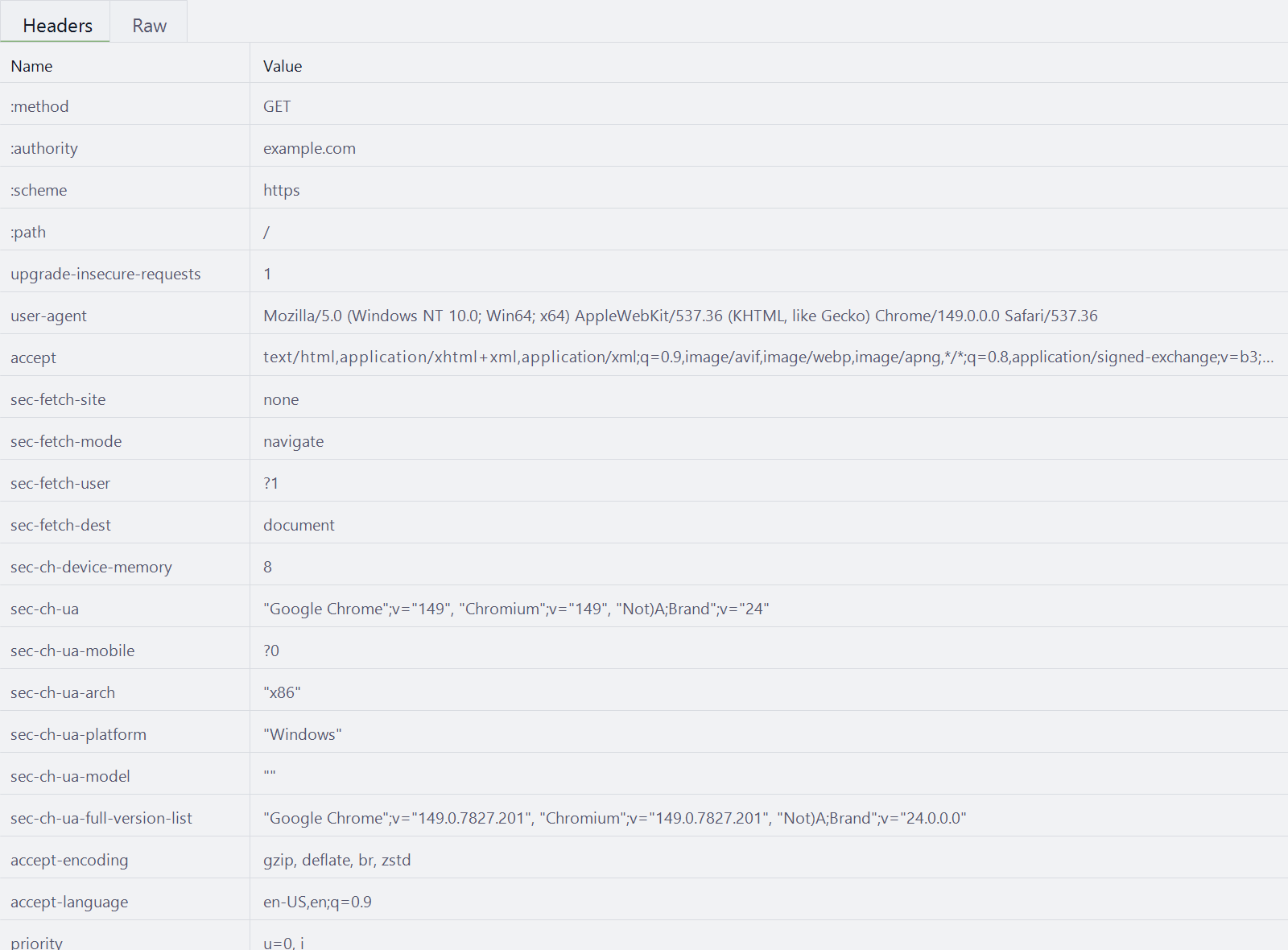
At Hyper Solutions, we handle the DataDome sensor data and telemetry required for these flows. But your request flow still needs to be recorded from the right browser context. If your headers say one thing and the sensor payload says another, DataDome can block the session even when the request looks close in an HTTP debugger.
The Real Mistake: Bad Recording State
Most bad DataDome implementations do not start with bad code. They start with a bad browser recording.
Two mistakes show up constantly:
- Recording in incognito
- Clearing only cookies instead of clearing the full Chrome profile state
Both mistakes create headers that look real because they came from Chrome. But they are not the headers you should be hardcoding into a clean request-based flow.
The browser was in the wrong state when you recorded it.
That matters because DataDome is not only looking at header order. It is comparing the full request flow against browser-side signals: Client Hints, cookies, storage access state, language state, device properties, and the generated sensor payload.
Small inconsistencies are enough to turn a "matches exactly" debugger comparison into a hard block.
Quick Detour: What Client Hints Are
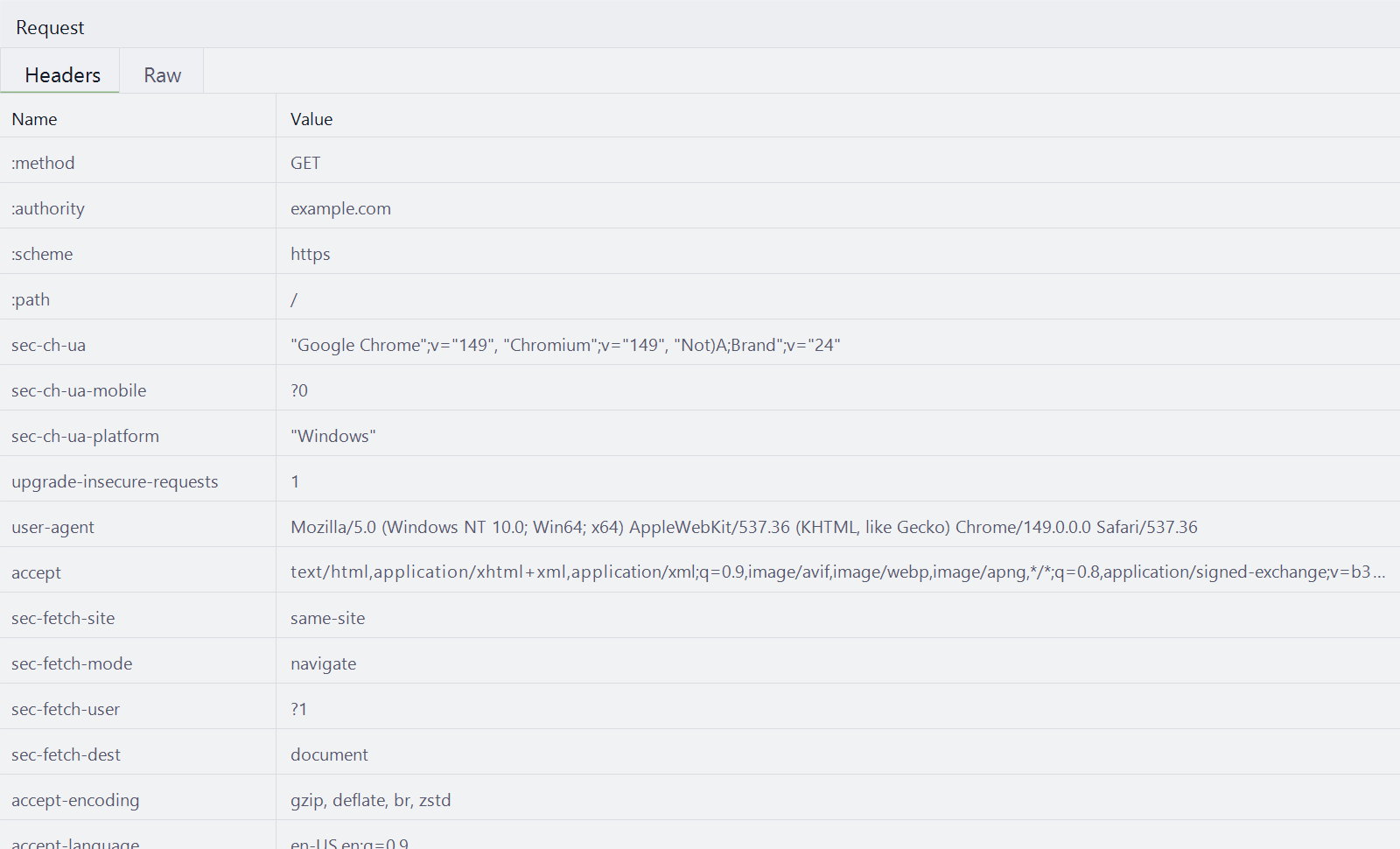
Client Hints are browser-generated HTTP request headers that expose selected details about the browser, device, platform, and network in a more structured way than the old User-Agent string.
You have probably seen headers like:
sec-ch-ua: "Google Chrome";v="149", "Chromium";v="149", "Not_A Brand";v="24"
sec-ch-ua-mobile: ?0
sec-ch-ua-platform: "Windows"
Those are Client Hints. Some low-entropy hints can appear by default in Chromium traffic.
More detailed hints, such as architecture, model, full version list, and device memory, are usually sent only after the server asks for them or after the browser exposes related values through JavaScript APIs such as navigator.userAgentData. Google's User-Agent Client Hints guide walks through which hints are low-entropy by default and which are gated behind an explicit request.
That is why Client Hints matter so much in DataDome flows. The HTTP headers and the JavaScript-generated sensor payload describe the same browser from two different angles.
If you copy Client Hint headers from a polluted browser capture, but your DataDome sensor payload describes a different browser state, the request starts contradicting itself.
Mistake 1: Recording In Incognito Or Guest
Incognito and Guest mode feel like clean browsers. For DataDome recording, they are not.
For DataDome work, incognito and Guest are different browser contexts with different observable behavior.
If you record in one of those contexts and then try to build a normal-browser request flow, you can end up copying headers and signals that do not match the sensor payload you actually use.
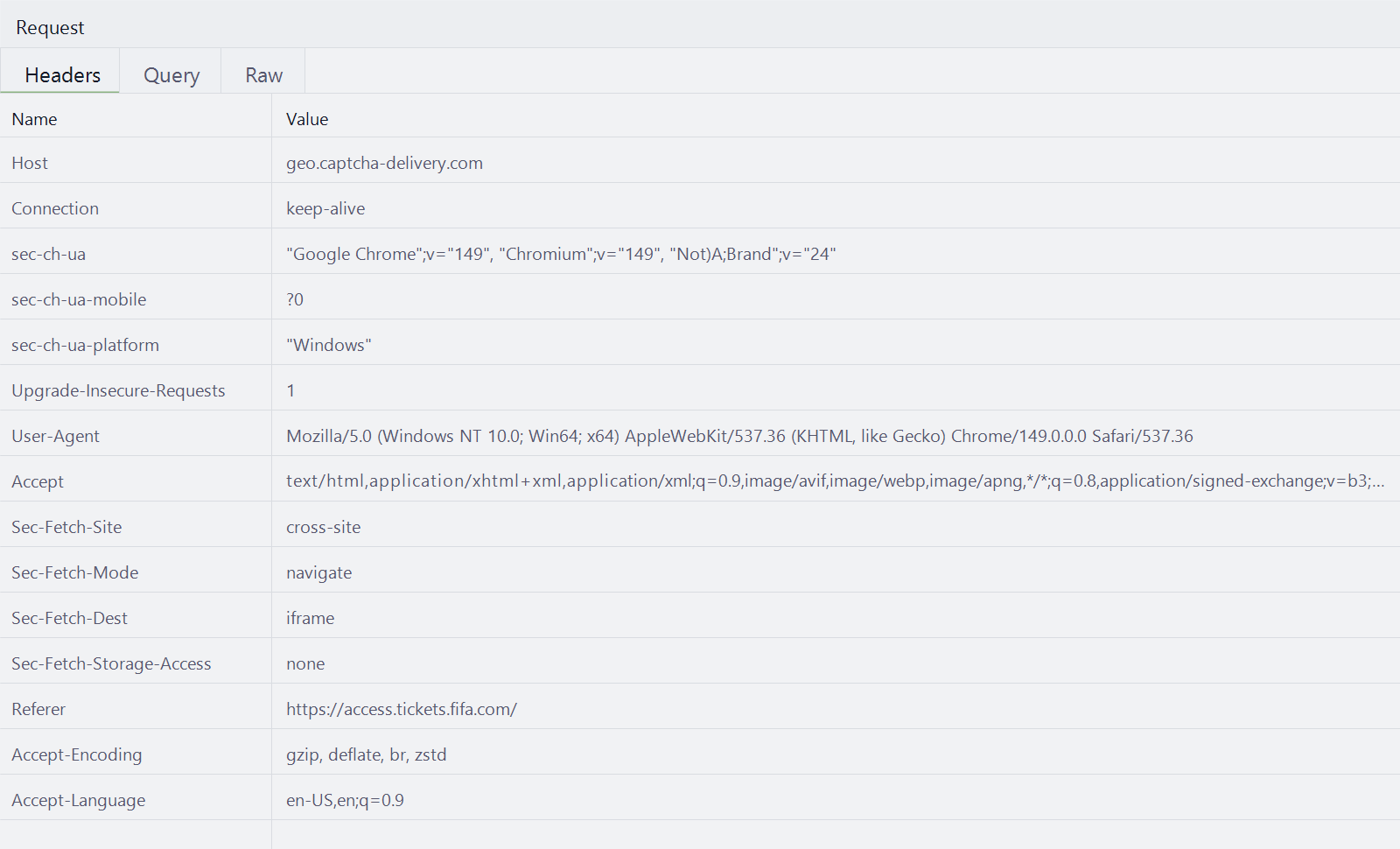
One common example is Sec-Fetch-Storage-Access.
In the DataDome flows we are talking about here, this header is sent on the geo.captcha-delivery.com requests.
Those requests go to DataDome's captcha/challenge delivery origin, and Chrome includes fetch metadata so the server can understand the request context. Sec-Fetch-Storage-Access specifically tells the server whether the current fetch has access to unpartitioned third-party cookie storage.
In a normal browser flow, that value should match the browser context that produced the DataDome payload. In incognito captures, the geo.captcha-delivery.com requests consistently show:
Sec-Fetch-Storage-Access: none
That does not mean your normal-browser DataDome flow should hardcode Sec-Fetch-Storage-Access: none. It means the request was recorded in a browser context where third-party storage is blocked or unavailable.
There are other incognito and Guest signals too.
The dd_testcookie probe is not a generic cookie check
In observed DataDome challenge behavior, DataDome checks whether a test cookie can be written and read:
document.cookie = "dd_testcookie=1; path=/; SameSite=None; Secure";

if (document.cookie.indexOf("dd_testcookie") === -1) {
  // Cookie did not stick: third-party cookies are blocked in this context.
} else {
  // Cookie round-tripped: third-party cookies are allowed in this context.
  document.cookie =
    "dd_testcookie=; expires=Thu, 01 Jan 1970 00:00:00 UTC; path=/; SameSite=None; Secure";
}
At first glance this looks like a generic "are cookies enabled?" check. It is not.
The giveaway is SameSite=None; Secure. You only need SameSite=None when a cookie has to work in a cross-site context. So when this runs inside a cross-site iframe, it is really a third-party cookie capability probe: write a cross-site cookie, immediately read it back, and infer support from whether the value survived the round trip.
That is why first-party pages can return true while cross-site frames split by profile:
- A normal Chrome profile can still allow third-party cookies, unless the user or profile policy has disabled them. The
SameSite=None; Securewrite is accepted, the read finds the cookie, and the probe returns true. - Guest and Incognito block third-party cookies by default. The write is dropped silently, no exception is thrown, and the read comes back without
dd_testcookie, so the probe returns false.
The important takeaway is that Guest mode does not disable cookies. First-party and same-site cookies still work. What changes is the default treatment of cross-site cookies, which is exactly what this probe is designed to measure. A normal profile with third-party cookies manually turned off can return false too, and that distinction matters if you are trying to reason about the signal.
One prerequisite is easy to miss: SameSite=None requires Secure, and Secure cookies require HTTPS outside localhost. If your test page or framing page is plain HTTP, the write can fail regardless of profile, so rule that out before concluding anything about cookie policy.
Language state can also create mismatches. A normal browser might expose:
["en-US", "en"]
An incognito or Guest-like context may expose only:
["en-US"]
That difference is not just "language equals incognito." navigator.languages is driven by the browser's language preferences, and Accept-Language can be assembled elsewhere in the stack. The issue is the inconsistency: if navigator.languages says ["en-US"] while the request header still sends Accept-Language: en-US,en;q=0.9, the headers and the sensor payload no longer tell the same story.
Those differences are small, but DataDome is built to care about small differences.
This is why people often get blocked more while recording from incognito or Guest. The payload itself can contain incognito-like or third-party-cookie-blocked signals. Then the developer copies headers from that recording, uses normal-browser sensor data later, and ends up with a mixed story:
- The request headers say incognito-like or Guest-like context.
- The sensor data says normal browser.
- The cookies and challenge state come from another flow.
- The header order looks correct, so the mistake is easy to miss.
DataDome does not need one giant contradiction. A few small contradictions are enough.
You can record from incognito if you account for the fact that Sec-Fetch-Storage-Access: none belongs to that context and the recording itself does not get blocked. If you later replay that flow as a normal browser context, none would have to be replaced with active in your HTTP client code. The problem is that this is still a more fragile capture environment: DataDome is often stricter with incognito or Guest-like signals, so you are more likely to get challenged or blocked while recording. That is why we recommend recording from a clean normal Chrome profile whenever possible, then keeping the headers and sensor payload aligned with that same context.
Mistake 2: Clearing Cookies But Not Full Browser State
The second mistake is even more common.
A client records a DataDome flow, hits a hard challenge, and Chrome receives an Accept-CH response header. Then the client wants to record a fresh flow, so they clear cookies and try again.
That sounds reasonable, but it is not enough.
Accept-CH is a response header that tells the browser which Client Hints the server wants on later requests. DataDome commonly includes hints such as:
Accept-CH: Sec-CH-UA,Sec-CH-UA-Mobile,Sec-CH-UA-Platform,Sec-CH-UA-Arch,Sec-CH-UA-Full-Version-List,Sec-CH-UA-Model,Sec-CH-Device-Memory
Once Chrome has seen that, it can remember the Client Hint opt-in for the profile. Clearing cookies does not necessarily reset that browser profile state.
So the next recording starts with a trap:
- You record a DataDome hard challenge.
- DataDome returns
Accept-CH. - Chrome remembers that the origin asked for extra Client Hints.
- You clear cookies.
- You record again in the same profile.
- Extra
Sec-CH-*headers appear on the first request. - You copy those headers into your request flow.
Now your first request includes values that should not be there in a clean first request.
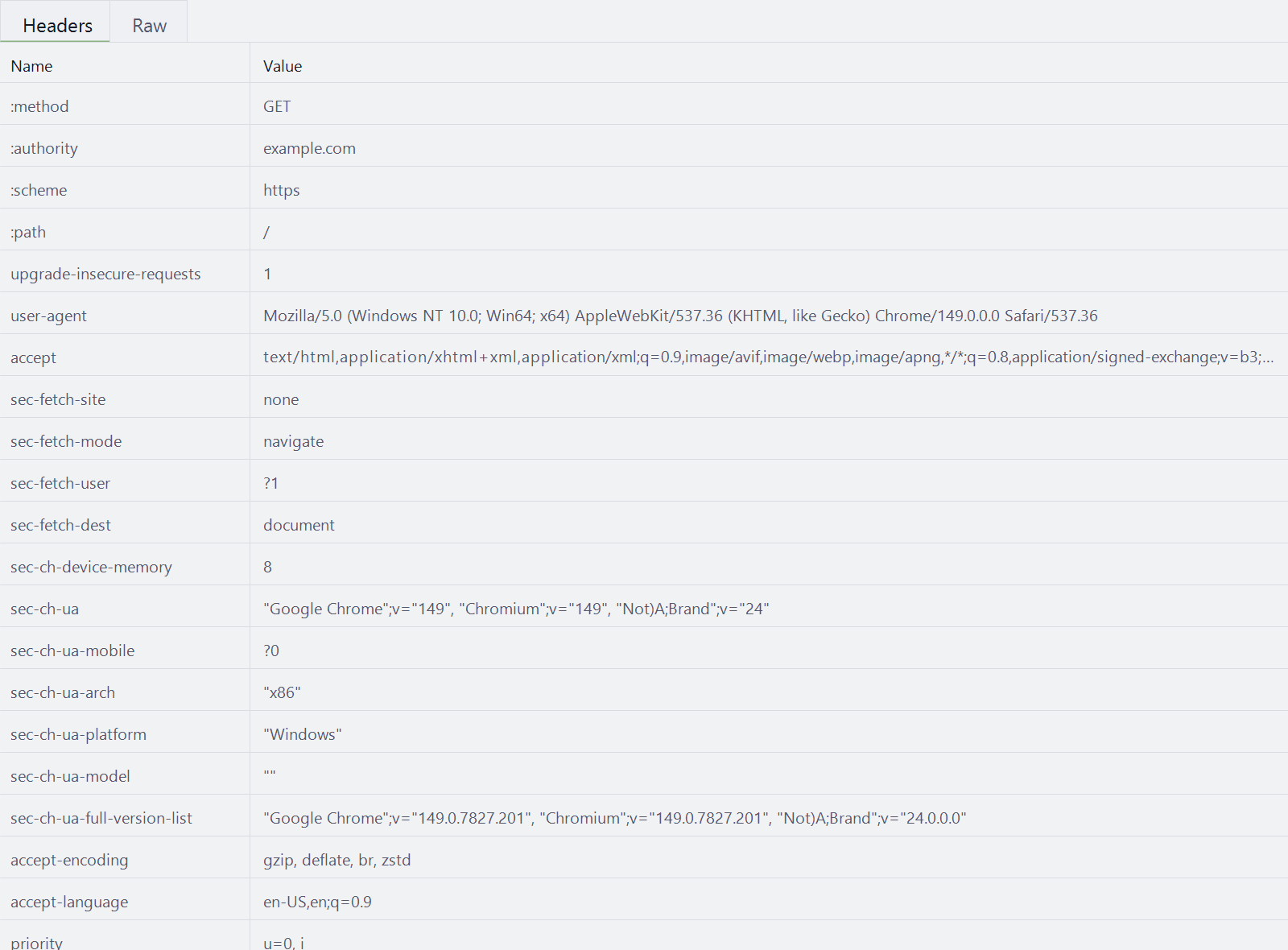
This is where people get burned by headers like:
sec-ch-ua-archsec-ch-ua-full-version-listsec-ch-ua-modelsec-ch-device-memory
If those show up before the flow has actually reached the DataDome step that requests them, you are not looking at a clean first request. You are looking at browser profile pre-state.
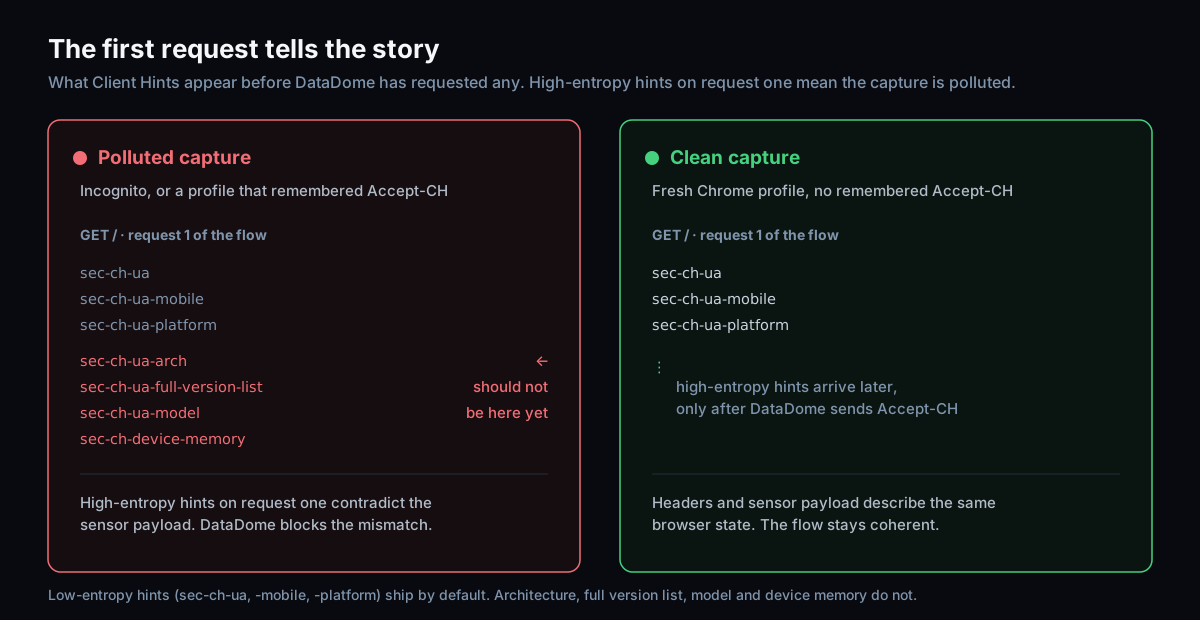
Put plainly, the difference is in what the very first request carries:
- A clean first request carries only the low-entropy hints Chrome sends by default:
sec-ch-ua,sec-ch-ua-mobile,sec-ch-ua-platform. - A polluted first request adds high-entropy hints that should not be there yet:
sec-ch-ua-arch,sec-ch-ua-full-version-list,sec-ch-ua-model,sec-ch-device-memory.
That creates mismatches fast.
For example, your first request might include one full Chrome version from the stale Client Hint state, while the later DataDome payload or API-generated sensor data contains another. The values look very close in a debugger, but they do not describe the same browser session.
The obvious question is:
How can your request know the full version before hitting the API or challenge flow that dynamically returns the matching values?
It cannot.
If the value is present because a previous browser recording left state behind, hardcoding it into the request client will only make the mismatch permanent.
The fix is not to copy more headers. The fix is to record the flow properly.
Use a new Chrome profile, or remove all-time browser history and site data before recording. Do not just clear cookies for the target domain. You want the first request in your debugger to represent a real first request from a clean browser profile.
Headers And Sensor Data Must Tell The Same Story
DataDome's client-side checks collect browser, device, and behavior-related signals. That includes values exposed through browser APIs such as navigator.userAgentData, navigator.deviceMemory, navigator.languages, navigator.hardwareConcurrency, navigator.platform, viewport properties, touch support, online state, and webdriver indicators.
Those values need to line up with the HTTP layer.
If your headers say:
- Chrome version A
- Normal browsing context
- Specific platform and architecture
- Certain Client Hints already available
Then the DataDome sensor payload should not say:
- Chrome version B
- Incognito-like storage or cookie behavior
- Different language state
- Different platform or device properties
- Client Hint values generated at a later point in the flow
This is the core reason polluted captures are so dangerous. They make wrong values look official because they came from Chrome.
But Chrome in the wrong state is still the wrong source of truth.
How To Record A Cleaner DataDome Flow
A wire-level recorder helps here, because the mistakes in this post hide in header order and Client Hint timing that a normal HAR export or DevTools view smooths over. Our powhttp recording guide covers capturing a browser session with the exact header order and TLS intact so you can spot a polluted first request.
When you record a DataDome-protected flow for a request-based implementation:
- Start from a new Chrome profile when possible.
- If reusing a profile, remove all-time browser history, cookies, cache, and site data before recording.
- Prefer a clean normal Chrome profile over incognito or Guest, because those contexts are more likely to be challenged or blocked while recording.
- Do not treat a cookie clear as a full browser reset.
- Watch the first request carefully for unexpected
Sec-CH-*headers. - Treat
Sec-Fetch-Storage-Access: nonefrom incognito as an incognito signal, not a universal requirement. If replaying as a normal browser context, replace it withactive. - Do not hardcode high-entropy Client Hints just because they appeared in a polluted capture.
- Compare the HTTP headers against the sensor payload values, not only against another header list.
The point is not to make your request template longer. The point is to make the flow coherent.
Where Hyper Solutions Fits
If you are looking to get around DataDome from a request-based setup, you need more than copied headers.
You need the DataDome sensor data, challenge telemetry, and request flow to agree with each other. That is what Hyper Solutions provides. Our API returns the dynamic sensor data needed for DataDome flows, so you do not have to guess or hardcode browser-derived values from a polluted recording.
But the capture still matters. If you record in incognito, or reuse a Chrome profile that remembers Accept-CH, you can build mismatches into your flow before our sensors ever enter the picture.
Record from a clean normal Chrome profile. Keep the headers and payload aligned. Let Hyper Solutions handle the DataDome sensor data.
If you are working on DataDome-protected targets and want reliable request-based flows, register at hypersolutions.co.
FAQ
Is correct header order enough to pass DataDome from a request client?
No. Header order and a Chrome-like TLS fingerprint are necessary, but DataDome also compares the full request flow against browser-side signals: Client Hints, cookies, storage access state, language state, and the generated sensor payload. If those contradict your headers, the session can be blocked even when a debugger says the request matches.
Why does my DataDome flow get blocked even though the captured headers match a real browser?
Because the headers were probably captured from a browser that was in the wrong state. Recording in incognito or Guest, or clearing only cookies from a profile that already saw an Accept-CH response, produces headers that came from Chrome but do not describe a clean first request. The headers then disagree with the sensor payload you send later.
How do I know if my capture is polluted?
Look at the very first request. If it already carries high-entropy Client Hints such as sec-ch-ua-arch, sec-ch-ua-full-version-list, sec-ch-ua-model, or sec-ch-device-memory before the flow has reached the DataDome step that requests them, the capture is polluted. A clean first request only carries the low-entropy hints (sec-ch-ua, sec-ch-ua-mobile, sec-ch-ua-platform).
Can I record a DataDome flow in incognito?
You can, but you have to account for it. Incognito consistently sends Sec-Fetch-Storage-Access: none on geo.captcha-delivery.com requests because third-party storage is blocked. If you replay that flow as a normal browser context, that value would need to become active. Incognito and Guest are also more likely to be challenged while recording, so a clean normal Chrome profile is the safer default.
References
- Hyper Solutions: TLS Fingerprinting
- Hyper Solutions: Header Order
- MDN: Accept-CH
- Chrome for Developers: User-Agent Client Hints
- MDN: Sec-Fetch-Storage-Access
- MDN: Set-Cookie
- Privacy Sandbox: Third-party cookies restricted by default for 1% of Chrome users
- Chromium issue: navigator.languages and Accept-Language behavior
Bypass DataDome with a single API call
Skip the browser. Generate the sensor data, tokens and cookies you just read about over plain HTTP, with a free one-week trial.