
To bypass Incapsula (Imperva) without a headless browser, find out which layer the site uses (reese84, its dynamic variant, UTMVC or a captcha block), generate the matching payload, submit it from the same session that sends your requests, and renew reese84 before renewInSec runs out. The payloads can come from an API; the requests stay in your own HTTP client, the same split as in our Akamai and DataDome guides.
A site can use reese84, UTMVC or both, and can escalate to a captcha when something looks wrong. Many guides tell you to run a browser; this one shows how to keep your own HTTP client and read a captcha as a symptom rather than the problem.
1. Before you start: what a request-based Incapsula bypass means
This guide is about Incapsula's bot protection, the checks that decide whether automated traffic gets through. It is not about WAF rule bypasses or vulnerabilities.
In this guide the Hyper Solutions Incapsula solver API generates the reese84 and ___utmvc payloads. Your client keeps its own TLS, headers, cookies and proxies, and sends every request to the target site itself.
What you need before you write any Incapsula code (from our core requirements):
- a browser-grade TLS client with a current Chrome profile, such as
tls-clientorrnetin Python - the browser's real header order, captured from the wire rather than copied from DevTools (see our powhttp guide)
- one sticky proxy IP per session, which you also pass to the API
- a Chrome user agent whose version matches your
sec-ch-uaandsec-ch-ua-platformheaders
2. Identify which Incapsula layer you're facing
The layers are independent. Check for each one before writing any code:
- reese84. How you recognise it: a
reese84cookie, or anx-d-tokenrequest header according to our docs → solve it in section 4, renew it in section 6 - Dynamic reese84. How you recognise it: a "Pardon Our Interruption" page → section 5
- UTMVC. How you recognise it: a script loaded from
/_Incapsula_Resource?SWJIYLWA=…→ section 7 - Captcha block. How you recognise it: an iframe pointing to
/_Incapsula_Resource, with the fallback text "Request unsuccessful. Incapsula incident ID" → section 8
Check for the captcha iframe first: according to our captcha block docs, the block page itself also loads a /_Incapsula_Resource?SWJIYLWA=… script, so that script alone doesn't prove you're facing UTMVC. Incapsula responses also carry an x-iinfo header, which helps you confirm you're dealing with Incapsula at all.
/_Incapsula_Resource requests and the incident ID
/_Incapsula_Resource is the path Incapsula uses for its own scripts and checks. You'll see it in three places in this guide: the UTMVC script (?SWJIYLWA=…), the UTMVC activation request (?SWKMTFSR=1&e=<random>), and the captcha iframe, whose src carries documented parameters such as SWUDNSAI and incident_id. reese84 isn't one of them: its script sits on a site-specific path of random words (section 4). The text "Request unsuccessful. Incapsula incident ID" means the request was blocked; the layer checks above tell you what to fix. See the captcha block docs.
3. Build a consistent request session
- IP: the IP you pass to the API must be the IP the site sees; our docs name a mismatch as the most likely cause of a failed token. Use a sticky (session) proxy, never a rotating one, and look the IP up through that same proxy. See IP.
- User agent: keep one Chrome user agent per session, with
sec-ch-uaandsec-ch-ua-platformon the same version. - Headers: keep headers and header order identical to one browser, including the HTTP/2 pseudo-header order. See header order.
- TLS: use the newest Chrome profile your client ships (a slightly older one is acceptable), random TLS extension order, and HTTP/3 disabled. See TLS fingerprinting.
- Cookies: one clean cookie jar per session.
The API only generates the payloads. TLS, headers, cookies and every request to the site stay in your own client, and that's where most blocks come from.
4. Solve static reese84 step by step
On a static reese84 site the script path is unique per site but doesn't change. You can find it in DevTools as the POST request with ?d= in the URL.
- Fetch the script including its
?s=…query string, withAccept: */*,Sec-Fetch-Dest: script,Sec-Fetch-Mode: no-corsandSec-Fetch-Site: same-origin. - Generate the payload with the Hyper Solutions API. It needs the user agent, the page URL, the script, the script URL, your
Accept-Languageand the egress IP. Leavepowempty. - POST the payload to the script path with
?d=<host>andContent-Type: text/plain; charset=utf-8. - Read the response. It's JSON with
token,renewInSecandcookieDomain. - Set the
reese84cookie fromtokenoncookieDomain.
Details: reese84 docs and the Incapsula API reference.
# Adapted from the official example (python/incapsula/tls-client in hypersolutions-examples).
# The headers are illustrative and shortened: send your browser's full header set in wire order.
import tls_client
from hyper_sdk import Session, ReeseInput

# Chrome 155 at the time of writing; use whatever stable Chrome version is current when you run this.
UA = "Mozilla/5.0 (Windows NT 10.0; Win64; x64) AppleWebKit/537.36 (KHTML, like Gecko) Chrome/155.0.0.0 Safari/537.36"
PROXY_IP = "203.0.113.10" # the sticky egress IP the site sees
HOST = "www.example.com"
PAGE_URL = f"https://{HOST}/"
SCRIPT_PATH = "/abc-def/123456" # the path of the POST with ?d= in DevTools
SCRIPT_URL = f"https://{HOST}{SCRIPT_PATH}?s=..." # full script URL, including ?s=

# Use the newest Chrome profile your tls-client version ships.
client = tls_client.Session(
    client_identifier="chrome_152",
    random_tls_extension_order=True,
    disable_http3=True,
)
hyper = Session("YOUR_API_KEY")

script = client.get(SCRIPT_URL, headers={
    "user-agent": UA,
    "accept": "*/*",
    "sec-fetch-dest": "script",
    "sec-fetch-mode": "no-cors",
    "sec-fetch-site": "same-origin",
}).text

sensor = hyper.generate_reese84_sensor(ReeseInput(
    user_agent=UA,
    accept_language="en-US,en;q=0.9",
    ip=PROXY_IP,
    pageUrl=PAGE_URL,
    script=script,
    script_url=SCRIPT_URL,
    pow="",
))

resp = client.post(f"https://{HOST}{SCRIPT_PATH}?d={HOST}", data=sensor.payload,
                   headers={"content-type": "text/plain; charset=utf-8"})
result = resp.json()
client.add_cookies_to_session(PAGE_URL, [{
    "name": "reese84", "value": result["token"],
    "domain": result["cookieDomain"], "path": "/",
}])
renew_in = result["renewInSec"]
# To renew before renew_in seconds have passed: delete the reese84 cookie,
# fetch the script again and repeat the generate + POST steps above.
In Go (SDK v3), call session.GenerateReese84Sensor(ctx, &hyper.ReeseInput{…}). In JS, call generateReese84Sensor(session, new Reese84Input(…)); the constructor order is userAgent, ip, acceptLanguage, pageUrl, script, scriptUrl, then the optional pow. Complete, runnable flows for Go, Python and Node are in the examples repository.
5. Solve dynamic reese84 ("Pardon Our Interruption")
The "Pardon Our Interruption" page uses the dynamic reese84 variant, which can add a proof-of-work step. Check the browser's network log for a POST with the body {"f":"gpc"} to the script path. If it's there, send that POST yourself before generating the payload and pass the returned string to the API as pow; if it isn't, leave pow empty. The rest of the flow is the same as static reese84. See dynamic reese84.
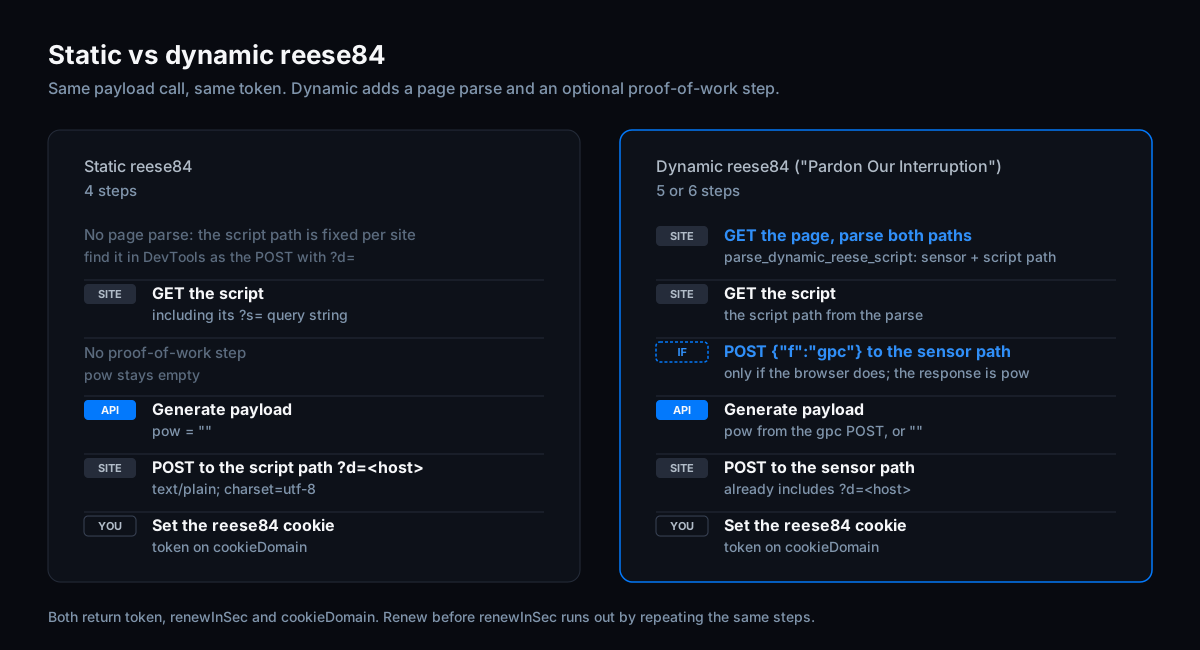
The Go, Python and JS SDKs include a helper to parse the dynamic script (ParseDynamicReeseScript, parse_dynamic_reese_script, parseDynamicReeseScript). It returns the sensor path, which already includes ?d=<host>, and the full script path. It only works on the "Pardon Our Interruption" page and returns an error on any other HTML.
# Continues the example above; PAGE_URL now returns the "Pardon Our Interruption" page.
from hyper_sdk.incapsula import parse_dynamic_reese_script

page = client.get(PAGE_URL, headers={"user-agent": UA})
sensor_path, script_path = parse_dynamic_reese_script(page.text, PAGE_URL)
script_url = f"https://{HOST}{script_path}"
script = client.get(script_url, headers={"user-agent": UA}).text # same Sec-Fetch headers as above

site_uses_pow = False # True only if the browser POSTs {"f":"gpc"} to the sensor path
pow_value = ""
if site_uses_pow:
    pow_value = client.post(f"https://{HOST}{sensor_path}", data='{"f":"gpc"}',
                            headers={"content-type": "text/plain; charset=utf-8"}).json()

sensor = hyper.generate_reese84_sensor(ReeseInput(
    user_agent=UA, accept_language="en-US,en;q=0.9", ip=PROXY_IP,
    pageUrl=PAGE_URL, script=script, script_url=script_url, pow=pow_value,
))
resp = client.post(f"https://{HOST}{sensor_path}", data=sensor.payload,
                   headers={"content-type": "text/plain; charset=utf-8"})
# Then set the reese84 cookie exactly as in the static example.
6. Renew reese84 before renewInSec runs out
The renewInSec value in each response tells you when to renew; our reese84 docs describe the token as expiring after that many seconds. The value can differ per response, so don't hard-code a lifetime (the example in our docs shows 896 seconds). A session that works and then gets blocked after roughly a quarter of an hour is the typical sign of an expired token.
Renewing doesn't need a separate flow. Delete the existing reese84 cookie, fetch the script again and POST a newly generated payload: the same steps that gave you the first token. You don't need a safety margin, as long as you renew before renewInSec runs out: an expired reese84 can get your requests blocked or bring back a "Pardon Our Interruption" page.
If a renewal fails, the IP is blocked. Don't keep retrying on it: start a fresh session on a new proxy.
7. Solve UTMVC (___utmvc) step by step
UTMVC sets the ___utmvc cookie. Note the three underscores: our docs call the name a common source of bugs. UTMVC is the older layer; reese84 was released to replace it, which is why you rarely see ___utmvc on sites today.
- Collect the inputs: the UTMVC script, your user agent, and the values of all
incap_ses_*session cookies. - Generate the payload with the API. Compress large request bodies; the SDKs do this automatically above 1,000 bytes.
- Set
___utmvcto the generated value. - Activate it with a GET to
/_Incapsula_Resource?SWKMTFSR=1&e=<random>. - Check success: the server answers with
max-age=0for___utmvc, which removes the cookie. That's intentional and means the activation worked. - Retry the blocked request.
The SDK helpers: ParseUtmvcScriptPath and GetUtmvcSubmitPath in Go, parse_utmvc_script_path and get_utmvc_submit_path in Python, parseUtmvcScriptPath and generateUtmvcScriptPath in JS. The generate call also returns a swhanedl value: some sites send it in an extra GET request, so check your capture and only send it where the browser does. The full flow, with every parameter, is in the UTMVC docs.
8. Why you still see a captcha, and how to debug it
If a site escalates to hCaptcha or GeeTest inside the /_Incapsula_Resource iframe, Hyper Solutions doesn't solve that captcha; you'd need a third-party hCaptcha or GeeTest solver. After a successful solve the server sets an incap_sh_* cookie.
More useful is asking why you got there. Our docs describe the captcha as what Incapsula shows when trust drops, and name an IP mismatch and a rotated user agent as common causes. A valid payload that still gets blocked is almost always a TLS, header, IP or cookie problem in your own client, so work top-down.
Triage: five questions first
- Did the API return an error? Then the inputs are wrong: a truncated script, the HTML page instead of the script, or a wrong script or page URL. Fix the inputs, not your HTTP client.
- Are you using a browser-grade TLS client rather than
requests,axios,net/httporfetch? - Is your header order captured from the real wire, using a tool such as powhttp, rather than copied from DevTools?
- Is the IP you pass to the API the IP the site sees? Rotating proxies break this.
- Is your cookie jar clean, with no missing, duplicate or wrong-domain cookies?
Incapsula symptoms, causes and fixes
- The challenge persists after you set the reese84 token: the token was rejected or the IP is blocked. Check the sticky IP, solve again, and make sure
tokenis saved asreese84on the returnedcookieDomain. - It works, then blocks after roughly 15 minutes: the token expired. Before
renewInSecruns out, delete thereese84cookie and run the reese84 steps again. - The renewal itself fails: the IP is blocked. Start a fresh session on a new proxy.
- "Pardon Our Interruption" won't clear: the proof-of-work step is missing, or the script body wasn't sent in full. If the browser posts
{"f":"gpc"}, do the same and pass the result aspow. - The static flow keeps failing: check whether the site serves the dynamic variant instead.
___utmvcisn't accepted: the cookie name is wrong (three underscores) or the activation GET is missing.- The UTMVC API rejects your input: pass the value of every
incap_ses_*cookie and the real script. - You get a captcha: go back to the triage list; once it's solved by a third party, reuse the
incap_sh_*cookie.
Still stuck after all of this? Capture the full failing flow with powhttp and share it with support together with the failing request. Send the capture as it is, without removing cookies, headers or tokens: support needs the complete flow to see where it breaks.
9. Request-based Incapsula checklist
- Layers identified: reese84, dynamic reese84, UTMVC, captcha (captcha iframe checked first)
- Payload IP = egress IP; one Chrome user agent with matching client hints; browser header order and TLS
- reese84: script fetched with its
?s=query; token set asreese84oncookieDomain; renewal scheduled beforerenewInSecruns out (delete the cookie, fetch the script, POST a new payload); a failed renewal handled as a blocked IP - Dynamic: if the browser posts
{"f":"gpc"}, its result passed aspow - UTMVC: all
incap_ses_*values sent; activation GET done;___utmvcremoved by the server (max-age=0); blocked request retried
10. FAQ
What is an Incapsula block?
The page Incapsula serves instead of the content you asked for, usually an iframe to /_Incapsula_Resource with the text "Request unsuccessful. Incapsula incident ID". It's rarely random: an IP that doesn't match the payload, a rotated user agent, or a TLS, header or cookie mismatch in your own client are the usual causes. Section 2 shows which layer you hit and section 8 how to debug it.
Is Incapsula the same as Imperva?
Yes. Incapsula became an Imperva product line, and Imperva has been part of Thales since 2023. The bot protection still uses the Incapsula name in its cookies and paths (incap_ses_*, visid_incap_*, /_Incapsula_Resource).
What is reese84?
Incapsula's core check, released to replace ___utmvc: a token set as the reese84 cookie after the challenge script's payload is accepted. The same response returns renewInSec and cookieDomain. Details: reese84 docs.
What does "Pardon Our Interruption" mean?
It's the page Incapsula shows for its dynamic reese84 variant. That variant can add a proof-of-work step: if the browser posts {"f":"gpc"} to the script path, you send the same POST and pass the result to the payload generator as pow.
What is ___utmvc?
The cookie set by Incapsula's older UTMVC layer, generated from the UTMVC script, your user agent and your incap_ses_* cookies. Most sites now use reese84 instead.
How long does a reese84 token last?
It varies per site. Use the renewInSec value from the response and, before it runs out, delete the cookie and run the reese84 steps again.
Can I replay cookies from another IP?
Don't build on it. The payload is generated for the IP you pass to the API, and our docs require that to be the IP the site sees. Keep one sticky proxy IP per session.
11. Next steps
- Product: the Incapsula solver API generates reese84 (static and dynamic) and
___utmvcpayloads. - Docs: Incapsula getting started and the Incapsula API reference.
- Code: Incapsula examples on GitHub for reese84, including the dynamic variant, in Go, Python and Node.
- Try it: every new account starts with a free one-week trial. Create an account.
Bypass Incapsula with a single API call
Skip the browser. Generate the sensor data, tokens and cookies you just read about over plain HTTP, with a free one-week trial.