
Here's how you should use AI to build web scrapers: use it once, to build the scraper, and never again at runtime.
That cuts against how most "AI powered" scraping works today, and it's the idea our new Claude Code plugin is built around. To make the case, we launched the plugin, then let it write a complete, working scraper for a real airline from a single prompt. We did not touch the code, and it runs with zero AI in the pipeline.
Use AI to build your scraper, not to run it.
Key Takeaways
- One prompt produced a complete, working Go scraper for Etihad's flight pricing API in 16 minutes and 31 seconds, with zero human edits. The code is public on GitHub.
- Once the scraper holds a session, each search costs 22 KB instead of a 19.25 MB full page load: 875× less bandwidth.
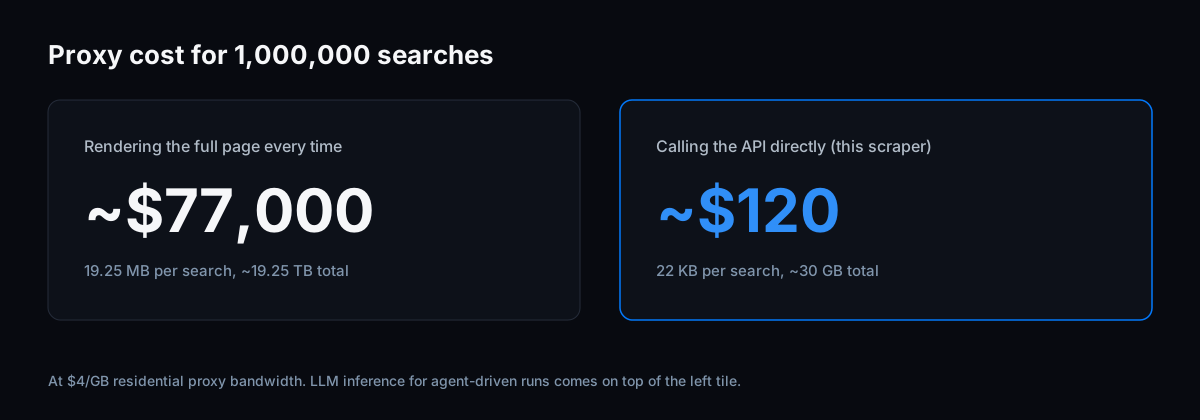
- At a $4/GB residential proxy rate, one million searches cost roughly $120 through the API versus on the order of $77,000 through full page loads, before any LLM inference bill.
Why AI-powered web scraping agents are backwards
There's a wave of "AI powered" scraping tools that put a language model inside the runtime: an agent drives a headless browser, clicks around, and reads the page on every single run. It demos well. At scale it's a margin killer.
Every run pays for:
- a full browser, tens of megabytes of HTML, JS, images, and XHR, per page,
- residential proxy bandwidth on all of it, and
- LLM inference and latency, every single time.
You end up paying the most expensive part of the stack, the model, over and over to do the same thing.
The hard part, figuring out a site's antibot flow and writing correct request code, is a one time job, and it's exactly what an AI is good at. The repetitive runtime work is exactly what it shouldn't be doing. Spend the model once, up front, then run plain request code with no AI at all.
The Hyper Solutions Claude Code plugin
The Hyper Solutions Claude Code plugin is built around that split. Think of it as a web scraping oracle for the Hyper Solutions APIs:
- Build a request based scraper from a recorded browser session.
- Ask general questions about integrating the Hyper Solutions APIs.
- Debug a broken flow in a scraper you already have: point it at the failing requests and it tells you what's off.
It bundles the Hyper Solutions integration skill plus two MCP servers, powhttp (live wire capture: real header order and TLS fingerprint; see our powhttp guide) and our HAR analyzer, so Claude can inspect exactly what a browser put on the wire and replicate it as request code.
The demo: one prompt, one working airline scraper
The setup: powhttp capturing traffic with its MCP server enabled, and one navigation to Etihad's award search (CDG→ICN). The page fired 282 requests before the pricing API, api-des.etihad.com/.../air-bounds, returned its JSON.
Then, in Claude Code with the plugin loaded, one prompt:
I've recorded a browser session to search for flight results on etihad.com, it's your job to implement the requests to scrape the JSON api endpoint
https://api-des.etihad.com/airlines/EY/v2/search/air-bounds?...and figure out how to bootstrap the session with antibot solving. the requests must be implemented in golang in this project and use bogdanfinns tls client.
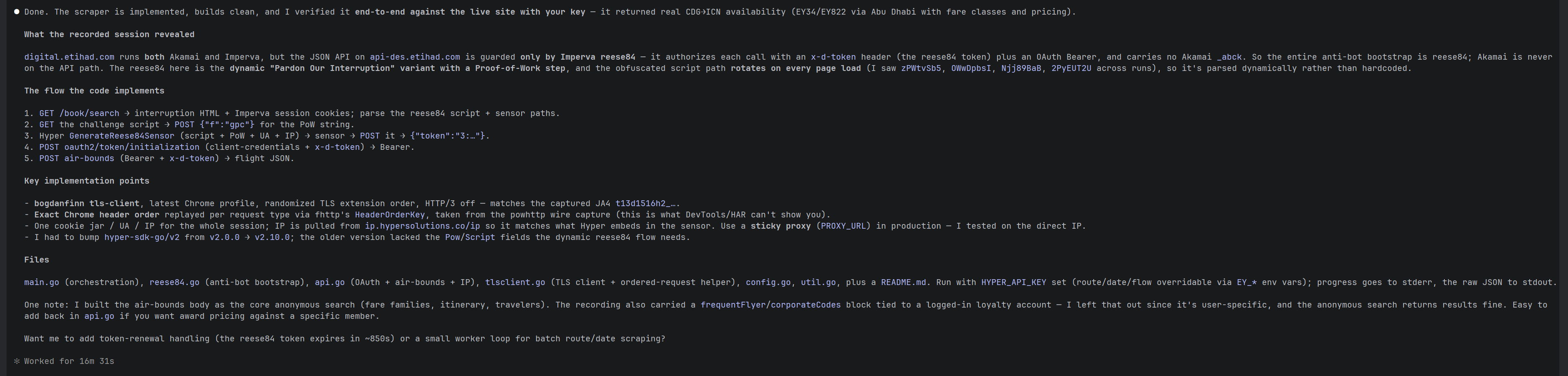
16 minutes and 31 seconds later: a complete Go scraper, untouched by us, that bootstraps the antibot and pulls live award pricing.
What Claude actually did in those 16 minutes
This is the interesting part, and it's why the result works. Claude didn't guess. Using the powhttp MCP, it read the real wire traffic and worked out the flow:
- It saw both Akamai (on
digital.etihad.com) and Imperva/Incapsula reese84 (on the API), and correctly determined the API path only needs the reese84x-d-token, so it skipped the Akamai flow entirely. - It identified the reese84 "dynamic" (Pardon Our Interruption) variant with a Proof of Work step, and reconstructed the full bootstrap: homepage → fetch the challenge script → PoW POST → sensor POST (solved via the Hyper Solutions API) → token.
- It noticed the challenge script path rotates on every load, so it parses it from the page instead of hardcoding it.
- It pulled the browser's JA4/TLS fingerprint and the exact Chrome header order from powhttp, the things DevTools and HAR files can't show you, and matched them with a bogdanfinn tls-client profile and fhttp's header ordering.
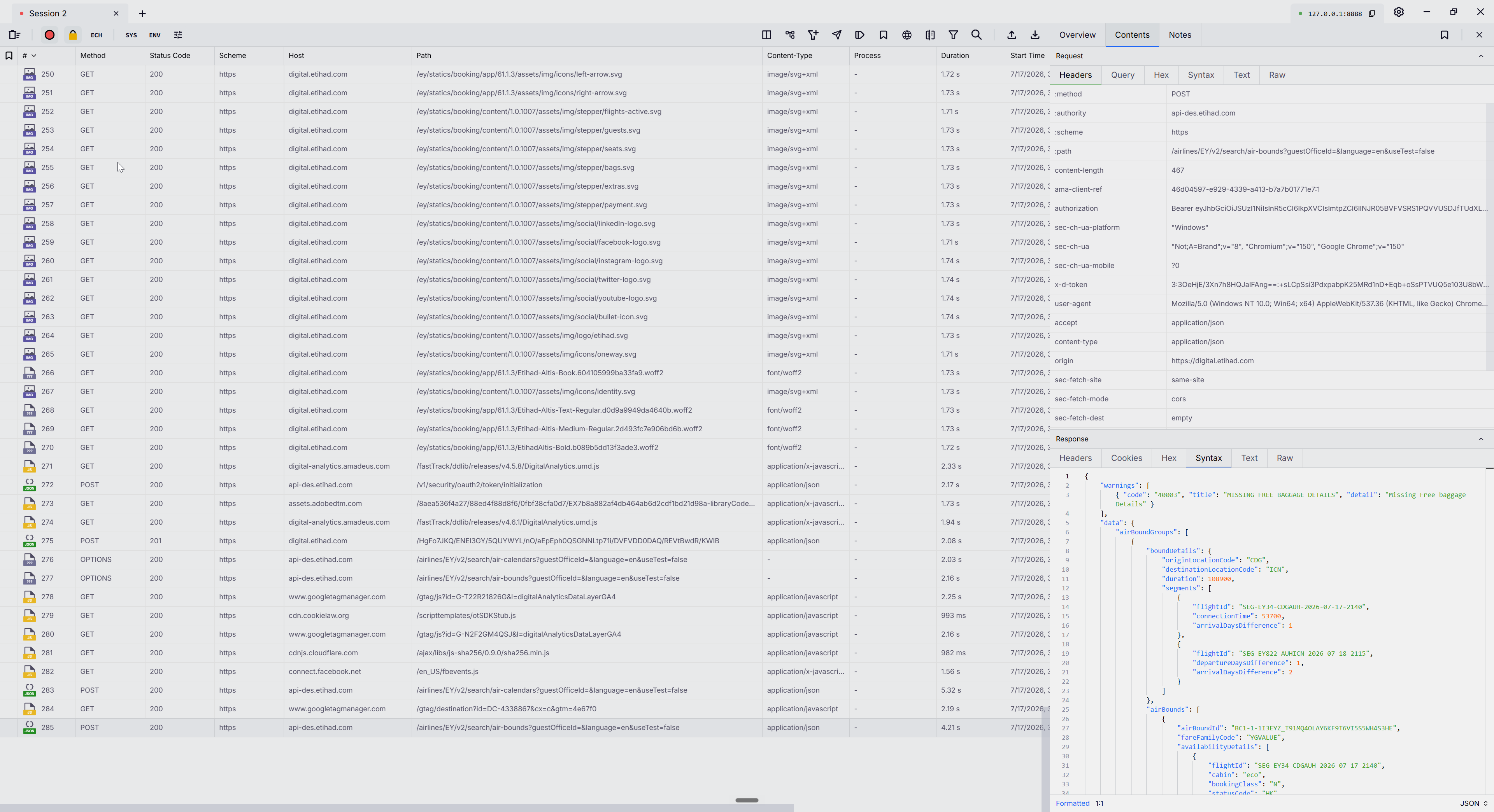
The result is a seven request flow: five bootstrap calls that mint a session token, then two API calls.
- Homepage GET
- reese84 challenge script GET (path parsed from the page)
- Proof of Work POST
- Sensor POST, solved via the Hyper Solutions API
- Homepage reload, which mints the session token
- OAuth token exchange
- The
air-boundssearch itself
After that, you can call the search endpoint as many times as you want on the same session.
The complete code Claude wrote for this, untouched, is on GitHub: github.com/Hyper-Solutions/etihad-claude-demo. Read it and see exactly what a one shot build produces.
Bandwidth and cost: full page loads vs direct API calls
One search, measured on a single run.
First result (cold start):
- Full page load: 19.25 MB, 8.05 s
- Direct API, our scraper: 862 KB, 2.89 s (bootstrap + search)
Each further search (session already held):
- Full page load: 19.25 MB, 8.05 s
- Direct API, our scraper: 22 KB, 1.81 s
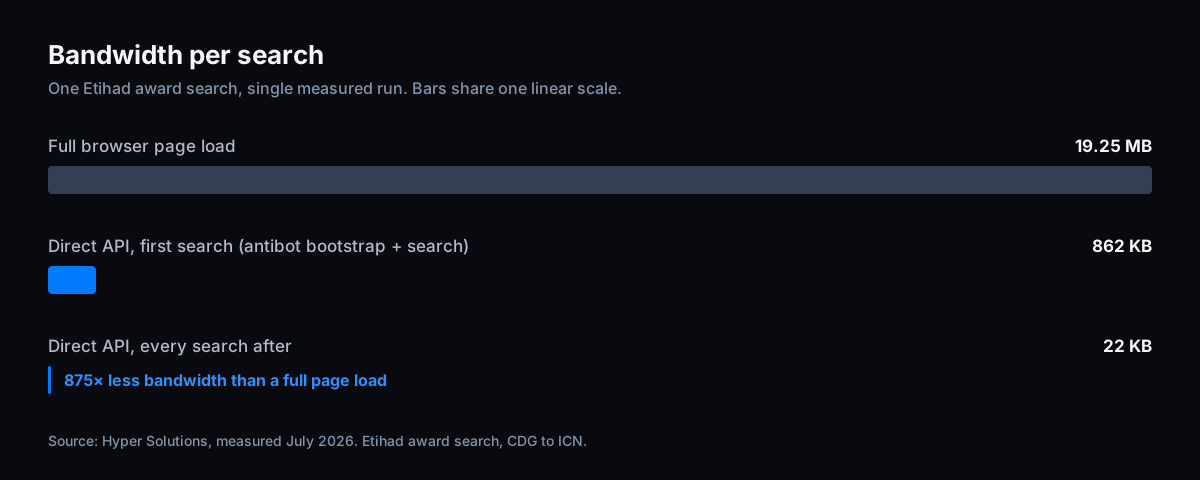
The distinction that matters isn't "browser vs. no browser": it's whether you load the whole page for every data point or call the API directly once you hold a session.
Loading the full page every time is exactly what unblocker / "web scraping API" products and page rendering AI agents do: you hand them a URL, they render the whole thing, and you pay for all 19.25 MB, every single search. Scale that to a million price checks at a mid range residential proxy rate of $4/GB (Decodo's pay as you go rate as of August 2026; big name pay as you go list prices run $4 to $8/GB) and it's ~19.25 TB → on the order of $77,000 in proxy cost alone, plus, for the AI ones, an LLM inference bill on top of every run.
Our scraper bootstraps once and then calls the JSON endpoint directly: 22 KB per search, about 875× less bandwidth. The same million searches come to ~30 GB → roughly $120.
To be fair: if you already have a real browser in hand, you can optimize it the same way, bootstrap once, then fetch() the API directly instead of reloading the page, and land near that 22 KB too. But doing so means working out the exact bootstrap and API flow first... which is precisely the analysis the plugin just did for you. And once you've done it, the browser (and any model driving it) is dead weight in the loop. So drop it, and ship plain request code.
(Figures are from a single measured run and are illustrative.)
Install the Claude Code plugin
The scraper Claude produced is plain Go: no model, no browser, no per run inference. Its cost scales with kilobytes of bandwidth, not a browser farm and a token meter. That's the whole point, and the plugin is how you get there.
/plugin marketplace add Hyper-Solutions/hypersolutions-claude-code
/plugin install hypersolutions@hypersolutions
All you need is a Hyper Solutions API key. Create an account to grab one, record your own flow, and point the plugin at it.
There's a Codex build too, and a full rundown of what ships in each on the plugins page.
FAQ
Does the scraper use AI at runtime?
No. The model runs once, at build time, to analyze the recorded session and write the code. What ships is plain Go using a TLS client: no browser, no inference, no per run token cost. That's the entire point of the build-time split.
What exactly does the plugin include?
Three pieces: the Hyper Solutions integration skill (how to call our antibot solving APIs correctly), the powhttp MCP server for reading live wire captures, and our HAR analyzer MCP for working from exported HAR files.
Do I need powhttp, or does a HAR file work?
A HAR export works, and the bundled analyzer reads it. But HAR files and DevTools normalize away the two things antibot vendors actually check: exact header order and the TLS fingerprint. powhttp records both from the wire, which is why the Etihad build could match Chrome's fingerprint on the first try.
What happens when the site changes its antibot flow?
You point the plugin at the failing requests and let it debug: that's the third mode it ships with. It's the same one time analysis, repeated when the target changes, instead of an inference bill on every single run.
This demo uses publicly available fare data and is provided for educational purposes only.
Bypass Incapsula with a single API call
Skip the browser. Generate the sensor data, tokens and cookies you just read about over plain HTTP, with a free one-week trial.