
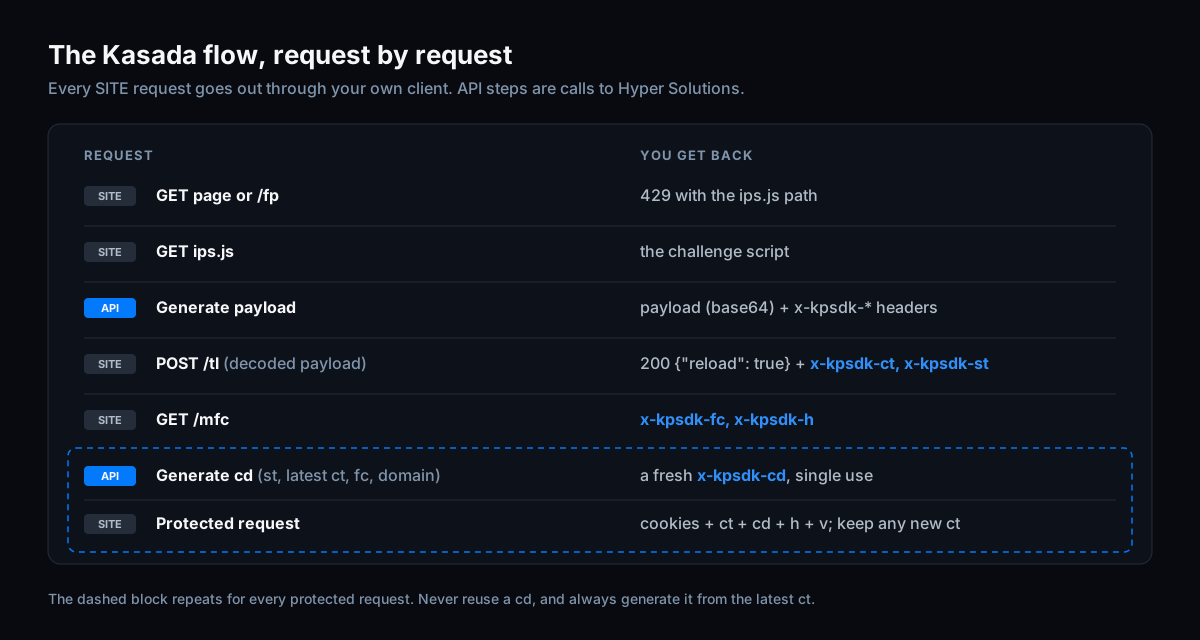
To bypass Kasada without a headless browser, your HTTP client has to do what the browser does: fetch the ips.js challenge that comes with the 429, generate a payload for it, post that payload to /tl, and then send a fresh x-kpsdk-cd proof-of-work with every protected request, all from one consistent session (same IP, user agent, headers and TLS). The payload and the cd value can come from an API; every request still goes out through your own client.
Kasada doesn't show you a CAPTCHA. When it decides a request needs checking, it answers with a 429 and an obfuscated script, and only lets you through once that script has been answered correctly. Many guides tell you to solve that with a stealth browser. This guide is for developers who already have an HTTP stack and want to keep it: how to recognise which Kasada flow you're facing, what to send where, which tokens to keep, and what to check when you still get a 429.
If you've read our Akamai or DataDome guides, the pattern will feel familiar: the anti-bot payload comes from an API, everything else stays in your own client.
1. Before you start: what a request-based Kasada bypass means
Kasada describes its Bot Defense as invisible client-side challenges combined with server-side detection, with code running inside a "highly obfuscated virtual machine" and no CAPTCHAs. In practice that means two things for a scraper:
- the client has to run (or answer) a JavaScript challenge and send the result back, and
- the server keeps judging every request afterwards, so the session has to stay consistent.
In this guide the Hyper Solutions Kasada solver API generates the challenge payload, the x-kpsdk-cd values and, on Vercel sites, the x-is-human header. Your client keeps its own TLS, headers, cookies and proxies, and sends every request to the target site itself.
What you need before you write any Kasada code (from our core requirements):
- a browser-grade TLS client with a current Chrome profile, such as
tls-clientorrnetin Python - the browser's real header order, captured from the wire rather than copied from DevTools (see our powhttp guide)
- one sticky proxy IP per session, which you also pass to the API
- a Chrome user agent whose version matches your
sec-ch-uaandsec-ch-ua-platformheaders
2. Identify which Kasada flow you're facing
Both flows share the same core: fetch the challenge script, generate a payload, post it to /tl. Where you meet the challenge is what differs.
How to tell if a site uses Kasada
- a 429 whose HTML loads a script like
/149e9513-01fa-4fb0-aad4-566afd725d1b/2d206a39-8ed7-437e-a3be-862e0f06eea3/ips.js?…(Flow 1) - a background request to
/149e9513-01fa-4fb0-aad4-566afd725d1b/2d206a39-8ed7-437e-a3be-862e0f06eea3/fp?x-kpsdk-v=…that returns a 429 (Flow 2) - any
x-kpsdk-*header in a request or response
The two path segments are the same on every Kasada site, and the /fp, /tl and /mfc endpoints and the BotID script all sit under that prefix. The ips.js query string does change, so parse the full ips.js path from the 429 response instead of hard-coding it; the SDK helpers do this for you.
Flow 1: the first request is blocked
Your very first GET returns a 429 with an HTML page. That page contains window.KPSDK and the ips.js script path. Until you've completed the challenge, the whole site is blocked; after a successful /tl you reload the page with the new cookies. In this flow, send the page URL as the Referer when you fetch ips.js and post to /tl. See Flow 1 in the docs.
Flow 2: a background fingerprint request
This is the standard implementation according to our docs. The page itself loads, but in the background the browser calls the Kasada /fp endpoint, which returns a 429. The x-kpsdk-v value is the version of Kasada's client script; copy it from your own capture, because it changes. Protected endpoints (often the API calls you're actually after) only work once the challenge is completed. The /fp URL is what loaded ips.js, so in this flow send the /fp URL as the Referer when you fetch ips.js and post to /tl. See Flow 2 in the docs.
3. Build a consistent request session
Kasada keeps judging requests after the challenge, so the session has to look like one browser from start to finish:
- IP: the IP you pass to the API must be the IP the site sees. Use a sticky (session) proxy, never a rotating one, and look the IP up through that same proxy. See IP.
- User agent: Windows Chrome is recommended and macOS Chrome is also supported. Keep the user agent,
sec-ch-uaandsec-ch-ua-platformon the same Chrome version and don't change them mid-session. Mobile-app flows work differently and are out of scope here; see Supported user agents. - Headers: match the browser's headers and their order 1:1, including the HTTP/2 pseudo-header order. See header order.
- TLS: use the newest Chrome profile your client ships (a slightly older one is acceptable), random TLS extension order, and HTTP/3 disabled. See TLS fingerprinting.
- Cookies: one clean cookie jar per session, with no duplicate or wrong-domain cookies.
To check your client against a real browser, record both and compare them, for example with powhttp.
4. Solve the Kasada challenge step by step
1. Fetch ips.js
ips.js is the obfuscated challenge script Kasada serves with the 429. Parse its path from the 429 response with the SDK helper (kasada.ParseScriptPath in Go, parse_kasada_script_path in Python, parseKasadaPath in JS) and fetch it with the same client, IP and headers you'll use for the rest of the session.
2. Generate the payload
Send the script to the Hyper Solutions API together with the user agent, the ips.js link, your Accept-Language and the egress IP. The response holds the payload and a headers object. All parameters are in the Kasada API reference.
3. POST the payload to /tl
The raw API and the Python and JS SDKs return the payload base64-encoded, so decode it to bytes first; the Go SDK already returns decoded bytes. Then POST it to /tl under the Kasada prefix, with:
Content-Type: application/octet-stream- every non-empty
x-kpsdk-*header the API returned (typicallyx-kpsdk-ct,x-kpsdk-dtandx-kpsdk-im) - your browser's header order
# Adapted from the official example: python/kasada/tls-client/main.py in hypersolutions-examples.
# The headers are illustrative. Copy the full set, in order, from your own browser capture.
import base64
import tls_client
from hyper_sdk import Session, KasadaPayloadInput
from hyper_sdk.kasada import parse_kasada_script_path

# Chrome 155 at the time of writing; use whatever stable Chrome version is current when you run this.
UA = "Mozilla/5.0 (Windows NT 10.0; Win64; x64) AppleWebKit/537.36 (KHTML, like Gecko) Chrome/155.0.0.0 Safari/537.36"
SEC_CH_UA = '"Google Chrome";v="155", "Chromium";v="155", "Not A(Brand";v="24"'
ACCEPT_LANGUAGE = "en-US,en;q=0.9"
PROXY_IP = "203.0.113.10"  # the sticky egress IP the site sees
BASE = "https://www.example.com"
PAGE_URL = BASE + "/"
KASADA_PREFIX = BASE + "/149e9513-01fa-4fb0-aad4-566afd725d1b/2d206a39-8ed7-437e-a3be-862e0f06eea3"  # the same on every Kasada site

# Use the newest Chrome profile your tls-client version ships.
client = tls_client.Session(
    client_identifier="chrome_152",
    random_tls_extension_order=True,
    disable_http3=True,
)
hyper = Session("YOUR_API_KEY")


def browser_headers(**extra):
    # Illustrative subset: a real browser sends more headers, in a fixed order.
    return {
        "sec-ch-ua": SEC_CH_UA,
        "sec-ch-ua-mobile": "?0",
        "sec-ch-ua-platform": '"Windows"',
        "user-agent": UA,
        "accept-language": ACCEPT_LANGUAGE,
        **extra,
    }


blocked = client.get(PAGE_URL, headers=browser_headers(accept="text/html,*/*;q=0.8"))  # Flow 1: 429 block page
ips_link = BASE + parse_kasada_script_path(blocked.text)  # the query string changes, so always parse it
referer = PAGE_URL  # in Flow 2, the /fp URL
script = client.get(ips_link, headers=browser_headers(accept="*/*", referer=referer)).text

payload_b64, kasada_headers = hyper.generate_kasada_payload(KasadaPayloadInput(
    user_agent=UA,
    ips_link=ips_link,
    script=script,
    accept_language=ACCEPT_LANGUAGE,
    ip=PROXY_IP,
))

tl_headers = browser_headers(
    accept="*/*",
    origin=BASE,
    referer=referer,
) | {k: v for k, v in kasada_headers.items() if v} | {"content-type": "application/octet-stream"}
tl = client.post(KASADA_PREFIX + "/tl", data=base64.b64decode(payload_b64), headers=tl_headers)
if tl.status_code != 200 or not tl.json().get("reload"):
    raise RuntimeError("/tl did not return reload: true")

# The cookie jar keeps the Kasada cookies; you keep these two headers.
ct = tl.headers["x-kpsdk-ct"]
st = int(tl.headers["x-kpsdk-st"])
In Go, session.GenerateKasadaPayload(ctx, &hyper.KasadaPayloadInput{…}) returns the decoded payload bytes and the headers; in JS, use generateKasadaPayload from hyper-sdk-js.
4. Store x-kpsdk-ct and x-kpsdk-st
A successful response is a 200 with {"reload": true}. Store the x-kpsdk-ct and x-kpsdk-st response headers. /tl also sets the Kasada cookies; their names differ per site, and your client's cookie jar sends them on every following request, so you don't need to handle them yourself.
5. Call /mfc
After /tl and before any protected request, the browser makes a GET to /mfc. Send it with the Kasada cookies and the headers your browser sends on that request; they change between Chrome releases, so take them from a current capture rather than copying them from a guide. Read back x-kpsdk-fc, an input for cd, and x-kpsdk-h, which you send on protected requests.
6. Generate a fresh x-kpsdk-cd for each protected request
The cd value is a proof-of-work. You generate it with the API from st, the latest ct, fc from /mfc and the site's domain. The optional workTime input is only for generating cd values in advance; leave it out otherwise. Never reuse a cd value.
7. Send the protected request
After Flow 1, reloading the page only needs the new cookies. Protected API requests in both flows carry the Kasada cookies plus x-kpsdk-ct, a new x-kpsdk-cd and, where the browser sends them, x-kpsdk-h and x-kpsdk-v. Check your browser's network log: not every endpoint carries every header.
# Continues the example above.
from hyper_sdk import KasadaPowInput

KPSDK_V = "j-x.x.xxxxx"  # the x-kpsdk-v value from your capture

# Send the headers your browser sends on /mfc; they change between Chrome releases.
mfc = client.get(KASADA_PREFIX + "/mfc", headers=browser_headers(accept="*/*", referer=referer))
fc = mfc.headers.get("x-kpsdk-fc", "")
h = mfc.headers.get("x-kpsdk-h", "")


def protected_get(url):
    global ct
    cd = hyper.generate_kasada_pow(KasadaPowInput(st=st, ct=ct, fc=fc, domain="www.example.com"))
    resp = client.get(url, headers=browser_headers() | {
        "x-kpsdk-ct": ct,
        "x-kpsdk-cd": cd,
        "x-kpsdk-h": h,
        "x-kpsdk-v": KPSDK_V,
    })
    ct = resp.headers.get("x-kpsdk-ct", ct)  # always keep the latest ct
    return resp
The headers in both snippets are illustrative and won't pass on a real site as they are: send the full set your browser sends, in its order. The complete Python example shows every request with its full header set.
In Go, session.GenerateKasadaPow(ctx, &hyper.KasadaPowInput{…}) returns the cd value; in JS, use generateKasadaPow. Complete, runnable flows for Go, Python and Node are in the examples repository.
5. Kasada token lifecycle: x-kpsdk-ct, st and cd
x-kpsdk-ct: Where it comes from:/tl, then any later response that returns a new one; What to do with it: send it where the browser does, and always use the latest value. A stalect, including the original one from/tl, makescdgeneration fail (see the API reference).x-kpsdk-st: Where it comes from:/tlresponse; What to do with it: input forcd; it stays as returned by/tlx-kpsdk-cd: Where it comes from: generated per request; What to do with it: single use, never reusex-kpsdk-fc,x-kpsdk-h: Where it comes from: the/mfcresponse; What to do with it:fcis an input forcd,his sent on protected requests where the browser sends itx-kpsdk-v: Where it comes from: your browser capture; What to do with it: send it where the browser does
You notice expiry as a 429 on a protected endpoint. Run the flow again through /tl and keep ct current. If a fresh solve still ends in a 429, the IP can be blocked: switch to a new IP and bootstrap a new session from the first request.
6. Why you still get a 429, and how to debug it
A 429 on /fp is the normal challenge trigger. A 429 on a protected endpoint after a successful /tl usually means the tokens or cookies have expired, and you run the flow again. It can also mean the IP is blocked; then you rotate to a new IP and bootstrap a new session with a clean cookie jar. If that keeps ending in a 429 on fresh IPs, the problem is almost always in your own client rather than the payload. Our debugging guide recommends working top-down.
Triage: five questions first
- Did the API return an error? Then the inputs are wrong: a truncated
ips.jsbody, the HTML page instead of the script, a wrongips.jslink or an emptyip. Fix the inputs, not your HTTP client. - Are you using a browser-grade TLS client rather than
requests,axios,net/httporfetch? - Is your header order captured from the real wire, using a tool such as powhttp, rather than copied from DevTools?
- Is the IP you pass to the API the IP the site sees? Rotating proxies break this.
- Is your cookie jar clean, with no missing, duplicate or wrong-domain cookies?
Kasada symptoms, causes and fixes
/tldoesn't return{"reload": true}: the payload wasn't base64-decoded, or the content type orx-kpsdk-*headers are wrong. Decode the payload, post it asapplication/octet-streamwith the returned headers, and fix the header order.- Protected requests return 429 right after solving: you reused a
cd. Generate a fresh one for every request. cdgeneration fails or is rejected:fcis missing or stale. Call/mfcafter every/tland pass itsx-kpsdk-fctocd. A stalecthas the same effect.- It works, then breaks later: tokens or cookies expired, or the IP got blocked. Run the flow again and keep
ctcurrent; if a fresh solve still fails, rotate the IP and bootstrap a new session. - Flow 2 fails but Flow 1 works: the
Refereron theips.jsand/tlrequests isn't the/fpURL. x-is-humanis rejected: the BotID header is stale or the IP changed. Fetchc.jsagain and regenerate it, see the next section.
Still stuck after all of this? Capture the full failing flow with powhttp and share it with support together with the failing request. Send the capture as it is, without removing cookies, headers or tokens: support needs the complete flow to see where it breaks.
7. Kasada and Vercel BotID
Vercel BotID's Deep Analysis is powered by Kasada, but it's a separate check. Solving Kasada doesn't give you a BotID token. You recognise it by an x-is-human header on protected requests. The flow: fetch c.js (a path like /149e9513-01fa-4fb0-aad4-566afd725d1b/2d206a39-8ed7-437e-a3be-862e0f06eea3/a-4-a/c.js?…), generate the x-is-human header from that script, your user agent, IP and Accept-Language, and regenerate it after a 429 or when the IP changes. All three SDKs support it: GenerateBotIDHeader in Go, generate_botid_header in Python and generateBotIDHeader in JS. See Vercel BotID. Vercel describes the product in its own BotID documentation.
8. Request-based Kasada checklist
- Flow identified (Flow 1 or Flow 2), with the matching
Refereronips.jsand/tl - One sticky IP, one supported Chrome user agent with matching client hints, browser header order and TLS for the whole session
ips.jspath parsed from the 429 and fetched with that same client- Payload base64-decoded (Python and JS) and posted to
/tlasapplication/octet-streamwith every non-emptyx-kpsdk-*header the API returned /tlreturned{"reload": true};ctandststored, Kasada cookies left to the cookie jar/mfccalled after/tlwith the headers your current browser sends;fcpassed tocd- A fresh
cdon every request where the browser sends one, generated with the latestct;ct,cd,handvonly where the browser sends them x-is-humanhandled if the site uses Vercel BotID
9. FAQ
Why does Kasada return a 429 instead of a CAPTCHA?
Kasada doesn't use a CAPTCHA. The 429 response carries the JavaScript challenge (ips.js) your client has to answer before it gets through.
Can you bypass Kasada with Python requests, without a browser?
Not with the plain requests library: its TLS fingerprint isn't a browser's and it can't control header order, which our docs list as a common mistake. Use a browser-grade Python client such as tls-client or rnet, which the official Python examples use; the challenge payload and cd come from the API.
Do I need to keep the same IP for the whole session?
Yes. The payload is generated for the IP you pass to the API, and that has to be the IP the site sees. Use one sticky proxy IP per session and don't rotate it mid-flow.
Which user agents work with Kasada?
Windows Chrome (recommended) and macOS Chrome, plus specific mobile-app user agents listed in our docs.
10. Next steps
- Product: the Kasada solver API generates the
ips.jspayload, thex-kpsdk-cdvalues and thex-is-humanheader. - Docs: Kasada getting started and the Kasada API reference.
- Code: Kasada examples on GitHub in Go, Python and Node.
- Try it: every new account starts with a free one-week trial. Create an account.
Bypass Kasada with a single API call
Skip the browser. Generate the sensor data, tokens and cookies you just read about over plain HTTP, with a free one-week trial.