
DataDome has started serving some challenge pages with the challenge script in its own file instead of inlining it in the page HTML. When that happens, the page you fetch no longer contains the code we need to solve against, and you have to fetch that file and send it to us.
We expect DataDome to roll this out completely, so this is worth doing now rather than when it becomes the only form.
Key Takeaways
- DataDome switches between inlining the challenge script and serving it from its own file, and it currently picks per request, so this has to be checked on every challenge rather than configured once.
- One SDK call tells you which case you are in. When the script is a separate file, fetch it and pass it as the new optional
scriptfield.- Not sending it when the page defers the script means the payload is not built from the script your page actually ran. That can go stale at any time, and a version mismatch gets the session blocked.
- Fetch the script per challenge rather than caching it. There is no guarantee that a given script URL keeps returning the same bytes, so a cached copy can silently drift from what the page was actually served.
What changed
Until recently, a DataDome challenge page carried its script inline. You fetched the page, sent us the HTML, and everything we needed was in there.
Now some challenge pages look like this instead:
<script defer src="https://ct.captcha-delivery.com/interstitial.1.33.0.202609141.js"></script>
The HTML you get still contains the challenge context we need, but the actual script is behind that URL. Here is the same interstitial challenge served both ways, measured on the wire:
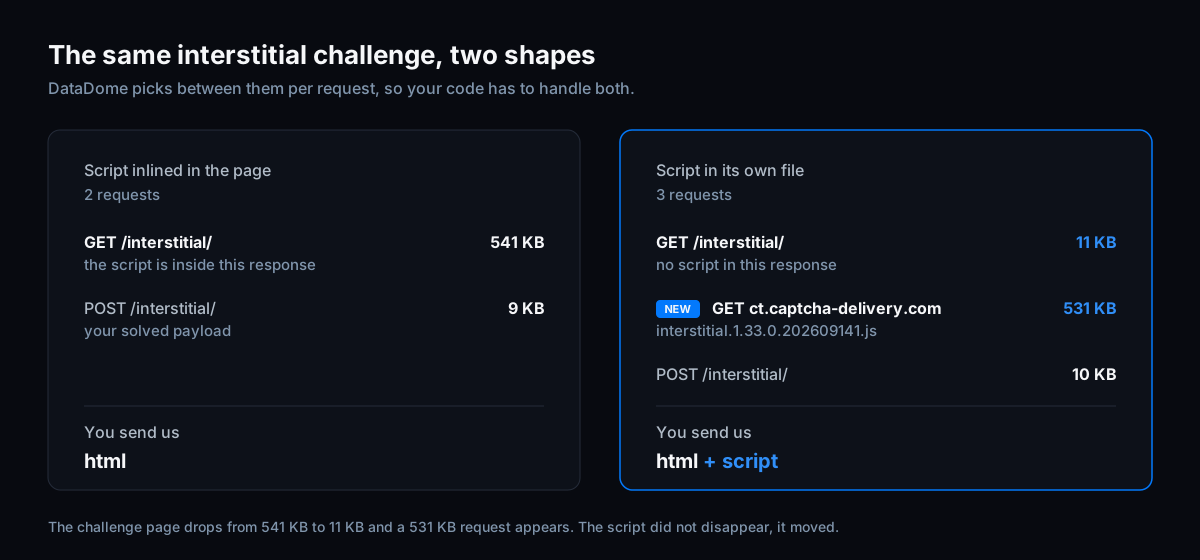
Nothing was removed. The 531 KB simply moved out of the page and into a request of its own, and that request is the one you now have to make and hand to us.
The slider captcha page does exactly the same thing, with a captcha. filename instead:
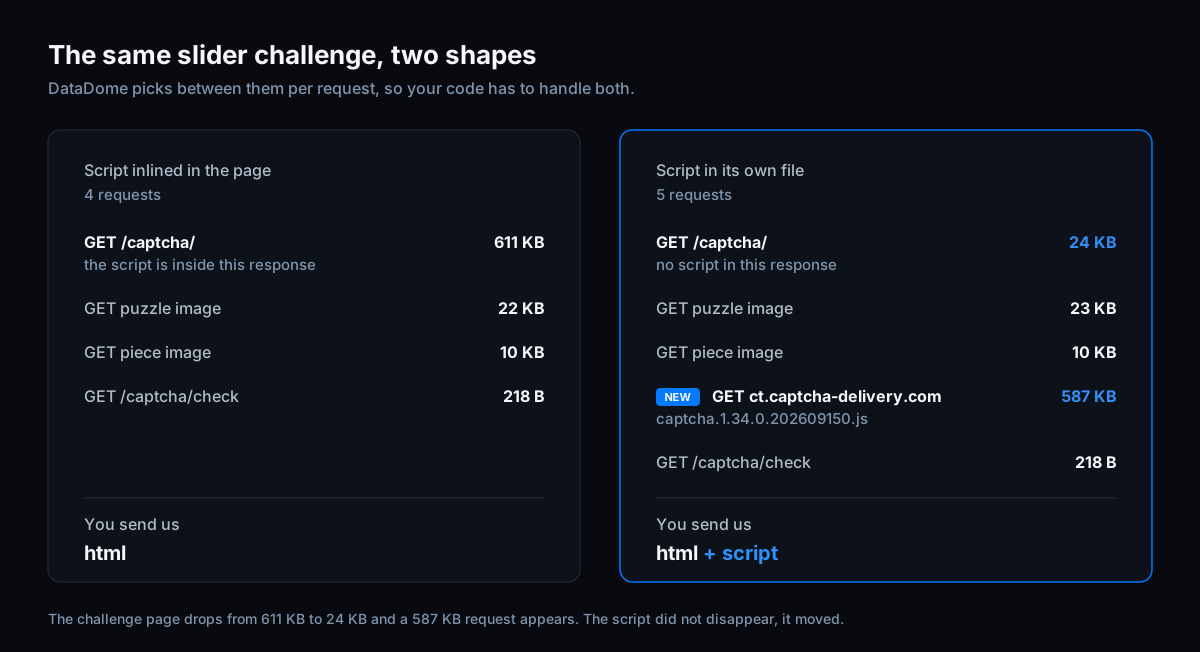
Note the version and build in the filename. DataDome ships new builds daily, and the payload we generate has to match the exact build the page served. When you send us the script, we solve against precisely what your page got, and the build number stops mattering to you entirely.
What happens if you do nothing
Nothing breaks immediately. When a page defers the script and you do not send it, we still generate a payload and solves keep working.
That payload is not built from the script your page actually ran, though, and DataDome ships new builds daily. It can go stale at any point, and once it does the payload no longer matches the script the page loaded. That is a version mismatch, and version mismatches get you blocked.
Sending the script removes the risk entirely, because we solve against exactly the bytes your page was served.
We are not putting a date on when the fallback stops. It stays as a safety net. But it is a safety net, not a strategy, and the further DataDome rolls this out the more of your traffic sits on it.
What to change
Three steps, and the middle one is the only real work.
1. Ask the SDK which case you are in. After you fetch the challenge page, run the HTML through the helper. It returns the script URL when the page defers it, and nothing when the script is already inline.
scriptURL, ok := datadome.ParseChallengeScriptURL(html)
script_url = parse_challenge_script_url(html)
const scriptUrl = parseChallengeScriptUrl(html);
2. Fetch that URL with the same client you used for the challenge page, so the request keeps your proxy, TLS fingerprint and headers. It is a normal script subresource request, the same one the browser would make.
3. Pass the body as script. The field is optional, so an inlined page just leaves it empty.
var script string
if scriptURL, ok := datadome.ParseChallengeScriptURL(html); ok {
    // GET scriptURL with the same client, read the body into script
}

payload, headers, err := session.GenerateDataDomeInterstitial(ctx, &hyper.DataDomeInterstitialInput{
    UserAgent:      userAgent,
    DeviceLink:     deviceLink,
    Html:           html,
    Script:         script, // empty when the page inlines the script
    IP:             ip,
    AcceptLanguage: acceptLanguage,
})
script = ""
script_url = parse_challenge_script_url(html)
if script_url:
    # GET script_url with the same client, read the body into script

result = session.generate_interstitial_payload(DataDomeInterstitialInput(
    user_agent=user_agent,
    device_link=device_link,
    html=html,
    script=script,  # empty when the page inlines the script
    ip=ip,
    accept_language=accept_language,
))
let script;
const scriptUrl = parseChallengeScriptUrl(html);
if (scriptUrl) {
    // GET scriptUrl with the same client, read the body into script
}

const result = await generateInterstitialPayload(session, new InterstitialInput(
    userAgent, deviceLink, html, ip, acceptLanguage, script,
));
The slider works exactly the same way. Same helper, same field, on DataDomeSliderInput.
You need these SDK versions or newer:
Go       hyper-sdk-go/v2  v2.11.0
Python   hyper-sdk        2.13.0
JS/TS    hyper-sdk-js     3.1.0
If you use our Playwright wrapper, upgrade to hyper-sdk-playwright 1.0.0-beta.14 and you are done. The browser already fetches the script as part of loading the challenge, so the handler captures it from that response and sends it for you. No code changes.
Fetch it per challenge, do not cache it
The obvious instinct is to cache the script, since the URL carries a version and a build and looks like it should be immutable. Resist it.
There is no guarantee that a given script URL keeps returning the same bytes. If it changes and you are still sending a copy you fetched earlier, you are back to the exact problem this field exists to solve, except the stale copy is now yours and it will be harder to spot. Fetch the script alongside the page, every challenge, the same way the browser does.
In practice that is one extra request per challenge. The body you send us stays roughly the same size as before, because the script was already travelling to us inside the HTML. It has moved from one field to another rather than been added.
Our request bodies accept gzip, br, deflate and zstd, so set content-encoding if you are not already. On a deferred challenge that takes the script from around 530 KB to roughly 120 KB on the wire.
On adding a field at all
We know a new required-in-practice input is a burden. You have to touch working code, redeploy, and re-verify a flow that was fine yesterday.
We add fields to these APIs only when there is no way to avoid it, and this is one of those times. The script is the thing being solved, DataDome moved it out of the page, and it changes daily. There is no version of this where we can quietly absorb it on our end without guessing at a build number that is already out of date.
So this is the whole change: one call to find out, one fetch, one field.
If something is unclear
Read this through first, then come and ask. We are in Discord and happy to look at a capture if your integration is doing something the examples do not cover.
Working end-to-end examples for every language and TLS client are in the examples repo, and the API reference is in the DataDome docs.
Bypass DataDome with a single API call
Skip the browser. Generate the sensor data, tokens and cookies you just read about over plain HTTP, with a free one-week trial.