
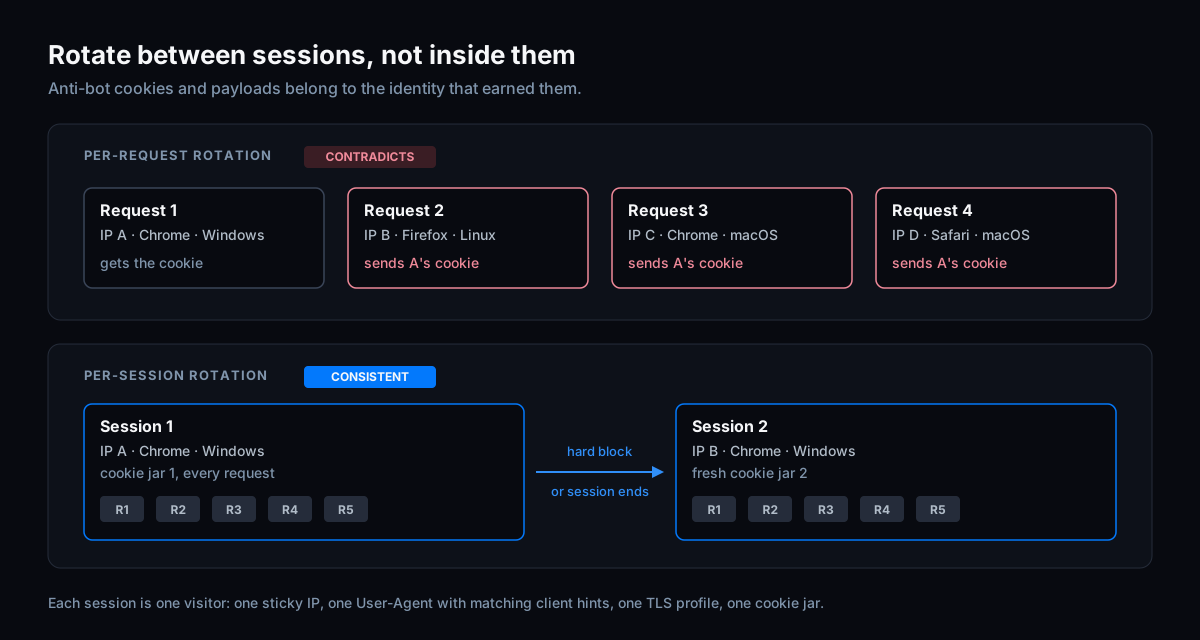
You bought residential proxies, built a list of User-Agents and rotate both on every request, because that's what most advice on web scraping without getting blocked says to do. You're still blocked, and maybe sooner than before. That isn't bad luck. Modern anti-bot systems judge a session, not a single request, and a session whose IP, User-Agent and fingerprint change from one request to the next contradicts itself. Rotation helps between sessions. Inside a session, consistency is what passes.
Proxies and User-Agents are only part of how you bypass bot detection. This post explains why per-request rotation backfires, which contradictions it creates, and how to rotate in a way that works with the anti-bot instead of against it.
Key Takeaways
- Anti-bots tie trust to a session: cookies and tokens are issued to the IP, User-Agent and fingerprint that earned them. Change one mid-session and the session no longer matches its own cookies.
- Random User-Agent rotation creates contradictions a server can see: a Firefox User-Agent on a Chrome TLS handshake, Chrome client hints next to a Safari User-Agent, a
sec-ch-uathat no real Chrome ever sent.- Rotate between sessions: a new session gets a new sticky IP, a fresh cookie jar and one internally consistent identity, and keeps them until it ends.
- Good residential proxies still matter. When they get blocked anyway, the problem is usually the session riding on them, not the IPs.
Why per-request rotation backfires
Most anti-bot flows follow the same pattern. Your first requests look like a new visitor. The protection runs its checks, and when they pass, it hands that visitor something: an Akamai _abck cookie that becomes valid, a datadome cookie, an Incapsula reese84 token. From then on, it expects that visitor to keep looking like the visitor it trusted.
Per-request rotation breaks that in two ways.
The cookie no longer fits the traffic. A token earned on IP A with Chrome on Windows comes back on the next request from IP B with a different User-Agent. Several of these systems generate their payloads for one specific IP and User-Agent. On Akamai, a payload generated for one IP stops matching the moment the IP changes, and the session built on it is no longer valid.
Every request starts from zero. If each request arrives as a new visitor, each one meets the anti-bot as an unknown client and has to pass its checks from scratch. You pay for those checks again and again, in time and in solves, and never get the benefit of a session that has already earned trust.
Rotating proxies make the first problem worse in a way that is easy to miss. A rotating proxy hands out a new IP per connection, not per session you define. The IP you read at the start of a flow is not necessarily the IP the site sees three requests later. Our proxies and IP docs walk through how that breaks a payload: you fetch your IP, generate a payload for it, the proxy rotates when it opens the next connection, and the site sees a different address than the one the payload was built for.
The contradictions random User-Agent rotation creates
A User-Agent string is one claim among many. A real browser's claims agree with each other, and a randomly picked string from a list usually disagrees with something:
- User-Agent versus TLS fingerprint. A Firefox or Safari User-Agent on a connection whose TLS handshake is Chrome's (or Python's) says two different things before the first header is read.
- User-Agent versus client hints. Chrome on desktop and Android sends
sec-ch-ua,sec-ch-ua-mobileandsec-ch-ua-platformon every HTTPS request. Firefox and Safari don't send these hints at all, and neither does Chrome on iOS, which runs on WebKit. A Safari User-Agent next tosec-ch-ua, or a desktop Chrome User-Agent without it, describes no real browser. - User-Agent versus platform. A Windows User-Agent with
sec-ch-ua-platform: "macOS"is a contradiction in two headers of the same request. - User-Agent versus header order. Browsers send HTTP/2 pseudo-headers in different, stable orders: Chrome sends
:method :authority :scheme :path, Firefox and Safari use other orders. A Firefox User-Agent with Chrome's order disagrees with itself. - User-Agent versus the calendar. Since Chrome 153 in September 2026, Chrome ships a new stable version every two weeks. A User-Agent list collected a year ago is mostly versions nobody runs anymore, and a version that hasn't been released yet is just as obvious.
The client hint is the one people get wrong most often, because it looks like a version number you can template. It isn't a template, though it is deterministic: Chromium derives the placeholder brand, its version and the brand order from the major version. Here is what Chrome 156 and Chrome 157 actually send:
Chrome 156: "Not:A-Brand";v="8", "Chromium";v="156", "Google Chrome";v="156"
Chrome 157: "Not-A.Brand";v="99", "Google Chrome";v="157", "Chromium";v="157"
The placeholder brand, its version and the order of the brands all change between versions. Take the 156 value and bump the numbers to 157, and you get a sec-ch-ua that no Chrome has ever sent. A User-Agent rotator that only swaps version numbers produces exactly that on every request. Derive the value with Chromium's algorithm for that major version, or capture it from a real browser.
What has to stay the same inside a session
Think of a session as one visitor. From its first request to its last, keep:
- One IP, from a sticky proxy, and the same IP in any payload request you make for it.
- One User-Agent, on a current Chrome version, with
sec-ch-ua,sec-ch-ua-mobileandsec-ch-ua-platformthat match it, and one platform: don't switch between Windows and macOS mid-session. - One HTTP client and TLS profile, so every request has the same handshake (TLS fingerprinting).
- One header order per request type, captured from a real browser (header order).
- One cookie jar, updated only by the server, without duplicates.
- The anti-bot's tokens, carried forward as the site issued them.
- The request sequence a browser would make: the page before its API calls, the challenge before the protected request.
None of these is exotic. They are the core requirements we list for every integration, and they all describe the same thing: one browser, behaving like one browser, for as long as the session lasts.
Rotate between sessions, not inside them
Rotation is still useful. It spreads load across IPs and lets you walk away from an identity that has gone bad. The unit you rotate is the whole session.
Start a new session when:
- The IP is hard-blocked. On DataDome, a block page whose
ddobject hastset tobvmeans the IP itself is banned; solving won't help, so move the session to a new IP. - The session can't be recovered. The anti-bot keeps rejecting it after you have handled its challenges correctly.
- The session has done its job, or your proxy's sticky session is about to expire.
A new session means a new sticky IP, a fresh cookie jar and a new HTTP client, with one identity chosen up front. You can vary that identity between sessions, as long as each one is internally consistent. We deliberately don't give a number of requests per session: it depends on the site and the vendor, and our powhttp guide shows how to measure it on your own target by replaying a request until a session stops being trusted.
Many residential proxy providers let you pin a sticky session with an ID in the proxy username, and a new ID gets a new IP. In a hotel-search scraper we built, each session put its own session ID into the Massive proxy username with a 30-minute session TTL, longer than any session ran. The exact syntax differs per provider.
In code, the point is to create the identity once and let everything in the session read from it:
import uuid
from dataclasses import dataclass, field

import tls_client

# Sticky-session syntax differs per proxy provider; this template is a placeholder.
PROXY_TEMPLATE = "http://user-session-{sid}:pass@proxy.example:8000"

CHROME_157_WINDOWS = {
    "user_agent": "Mozilla/5.0 (Windows NT 10.0; Win64; x64) AppleWebKit/537.36 (KHTML, like Gecko) Chrome/157.0.0.0 Safari/537.36",
    "sec_ch_ua": '"Not-A.Brand";v="99", "Google Chrome";v="157", "Chromium";v="157"',
    "platform": '"Windows"',
}


@dataclass
class ScrapeSession:
    """One visitor: one sticky IP, one identity, one client and cookie jar."""

    identity: dict = field(default_factory=lambda: dict(CHROME_157_WINDOWS))
    sid: str = field(default_factory=lambda: uuid.uuid4().hex[:12])

    def __post_init__(self):
        self.proxy = PROXY_TEMPLATE.format(sid=self.sid)
        self.client = tls_client.Session(
            client_identifier="chrome_152",  # newest profile; Chrome's TLS is unchanged from 152 to 157
            random_tls_extension_order=True,
            disable_http3=True,
        )
        self.client.proxies = {"http": self.proxy, "https": self.proxy}

    def base_headers(self):
        return {
            "sec-ch-ua": self.identity["sec_ch_ua"],
            "sec-ch-ua-mobile": "?0",
            "sec-ch-ua-platform": self.identity["platform"],
            "user-agent": self.identity["user_agent"],
        }


session = ScrapeSession()
# ... run the whole flow with session.client and session.base_headers() ...

# Hard block (for example DataDome t='bv') or the session has done its job:
# throw the whole session away and start a new one. Never swap only the IP or UA.
session = ScrapeSession()
The identity, the proxy session and the client are created together and thrown away together. Nothing in the flow can change one of them on its own.
Residential proxies still blocked? Check the session first
Good residential proxies matter. For some sites, datacenter and known proxy ranges are a detection signal on their own, and no client fix makes a flagged address clean. But a residential IP can't fix a session that contradicts itself, and that is the more common reason they "stop working".
To tell the two apart, put the exact proxy your scraper uses into a real browser and load the same page:
- The browser is blocked too: it's the IP. Start a new session on a different one.
- The browser gets through and your scraper doesn't, on the same IP: it's your session. Look for rotation inside the session, a mismatched User-Agent and client hints, the wrong TLS profile or a broken cookie jar.
And check the proxy setup itself: sticky mode, a session lifetime longer than your flow, a location that makes sense for the site, and the same exit IP in your payload requests as in your requests to the site. You can read your exit IP from https://ip.hypersolutions.co/ip, called through the same proxy.
Common advice, and what to do instead
- "Rotate the IP on every request." Use one sticky IP per session and rotate when you start a new session.
- "Rotate User-Agents from a big list." Use one current Chrome User-Agent per session, with matching client hints, platform and TLS profile.
- "Clear cookies so you look new." Keep one clean jar per session; when you want to look new, start a new session.
- "Residential proxies fix bot detection." They fix IP reputation. The session has to be consistent on top of them.
When the session is consistent and the site still challenges it, the remaining step is the anti-bot's own check, and that one is vendor-specific. Our request-based guides cover it for Akamai, DataDome, Incapsula and Kasada.
FAQ
Should I rotate User-Agents when scraping?
Not per request. Pick one current, real Chrome User-Agent per session, with client hints, platform and TLS profile that match it, and keep it for the whole session. Vary the identity between sessions if you want, as long as each one is consistent.
Why do residential proxies still get blocked?
Usually because of what rides on them: a session whose IP, User-Agent, client hints or TLS fingerprint change or disagree, or a cookie jar that carries tokens from another identity. Test the same proxy in a real browser. If the browser passes, the proxy is fine and the problem is your session.
Sticky or rotating proxies for scraping?
For anti-bot protected sites, sticky. The IP has to stay the same for the whole session so the anti-bot's cookies and payloads keep matching your traffic. Rotate by starting a new session on a new sticky IP.
How often should I rotate proxies?
There is no universal number. Rotate when a session is hard-blocked, can't recover, has finished its work or reaches the end of its sticky lifetime. How many requests a session survives depends on the site and the vendor; measure it on your own target instead of copying a number.
Can better proxies and User-Agents bypass bot detection?
Not on their own. Proxies and User-Agents are two of the signals. Anti-bots also read the TLS handshake, header order, client hints, cookies and the order of your requests, and many run a challenge on top that only a browser, or a payload generated for one, can answer.
Next steps
- Docs: Core requirements and proxies and IP.
- See your own session on the wire: How to use powhttp for request-based scraping.
- Not sure what blocked you? Find out which anti-bot sent the 403 before you change proxies.
- Code: the examples repository has complete request-based flows in Go, Python and Node.js.
- Try it on your target: every account starts with a free one-week trial. Create an account.
Solve Akamai, DataDome, Incapsula and Kasada in one request
Skip the browser. Generate the sensor data, tokens and cookies you just read about over plain HTTP, with a free one-week trial.